
GoS for Roblox for 1 Month
GoS for Roblox for 1 Month is the longer access option for players who want regular use of the GamingOnSteroids Roblox external tool. It includes combat settings, ESP visuals, world and player utilities, a modern menu, keybind options, crosshair controls and a full config manager.
The monthly pass is the stronger value if you already know you want to use GoS for Roblox across more than a short test. It gives you enough time to tune aim settings, decide which ESP visuals you actually want, create saved configs and follow community updates without renewing after only a few days.
GoS Roblox Overview
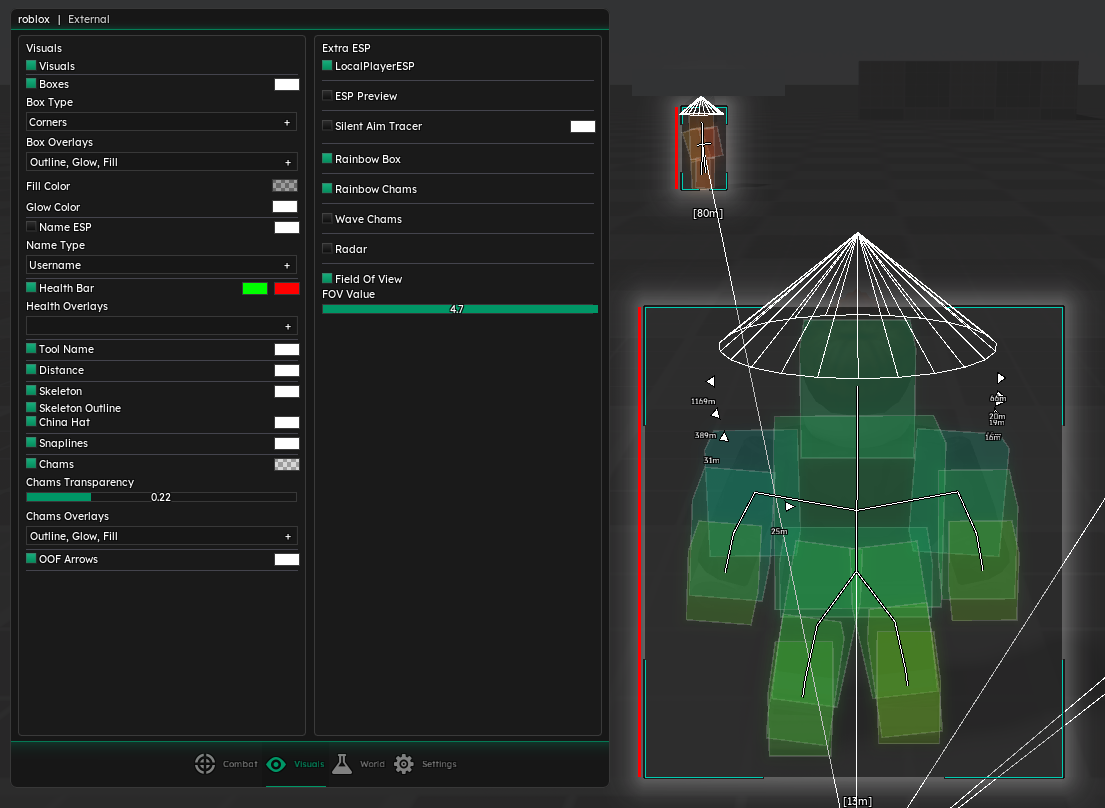
GoS for Roblox is built around a lightweight external interface with separate sections for Combat, Visuals, World and Settings. The reference feature topic describes a clean dark-themed menu, adjustable visual options, FPS-friendly behavior and a modular layout that keeps the most important options easy to find.
The tool is aimed at users who want configurable Roblox assistance instead of one fixed setup. You can build a minimal configuration with only a few visual aids, or a fuller setup with combat, ESP, radar-style awareness and world utilities depending on the game mode and your preference.
Main Features
Combat options such as silent aim, sticky aim, spoof mouse, hit chance, FOV, smoothing and prediction controls. Targeting helpers including closest-part selection, team checks, wall checks, auto-switch behavior and triggerbot timing. ESP visuals for boxes, corners, outlines, health, usernames, distance, tool names, skeletons and snaplines. Additional visual options such as chams, tracers, local player ESP, off-screen arrows, radar view, transparency and glow controls. World and player utilities including movement, camera, reload, armor and other quality-of-life options where supported. Modern menu with watermark, FPS counter, username display, VSYNC, keybind list and adjustable crosshair settings. Config manager for saving, loading, deleting and refreshing different setups. Combat and ESP
The combat section focuses on control and tuning. FOV settings define the active area, smoothing helps adjust how aim movement feels, prediction assists with moving targets, and hit chance gives another layer of behavior control. Triggerbot settings can be adjusted with range and delay options where supported.
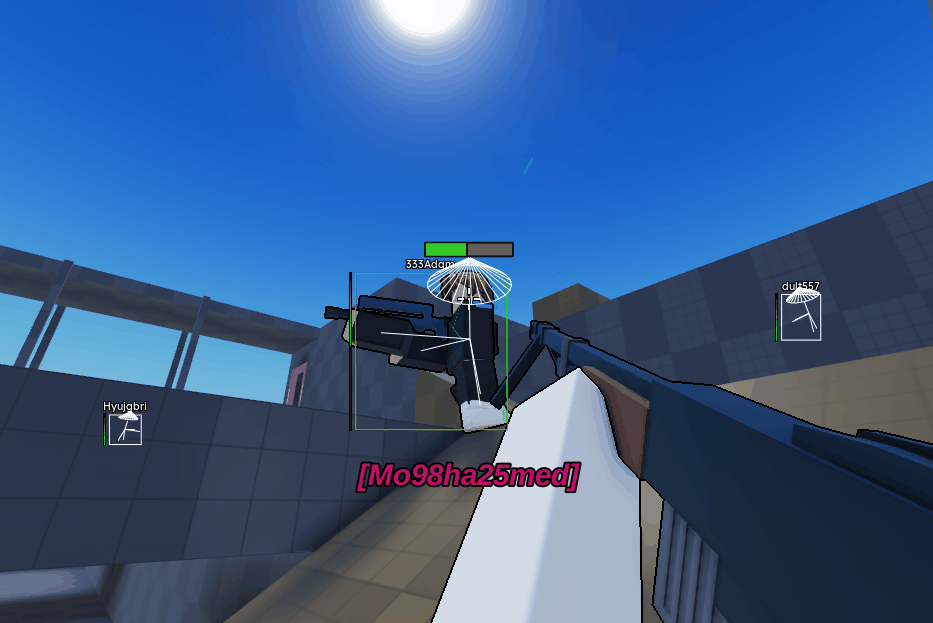
The ESP and visual tools are designed to improve awareness. Boxes, skeletons, health, names, distance, tools, snaplines and radar-style options help you read player positions faster. Visuals can be adjusted so the screen stays readable instead of overloaded.
World, UI and Configs
The World section includes player and movement-related utilities such as WalkSpeed, JumpPower, flight mode, freecam and other game-dependent options described in the feature topic. Availability can depend on the Roblox experience and current build.
The UI and config system are important for long-term use. You can tune a setup, save it as a named profile, load it again later, delete old profiles and keep different settings for different games or playstyles.
Why Choose 1 Month
Choose the 1 month pass if you plan to use GoS for Roblox regularly. It gives more time to test multiple Roblox experiences, tune visuals, adjust combat settings and create stable configs. If you only want a short trial first, the 1 week pass is available.
For the complete feature breakdown, read the GoS Roblox detailed feature explanation.
About GoS for Roblox for 1 Month
GoS Roblox External - 1 Month Access
GoS for Roblox for 1 Month is the longer access option for players who want regular use of the GamingOnSteroids Roblox external tool. It includes combat settings, ESP visuals, world and player utilities, a modern menu, keybind options, crosshair controls and a full config manager.
The monthly pass is the stronger value if you already know you want to use GoS for Roblox across more than a short test. It gives you enough time to tune aim settings, decide which ESP visuals you actually want, create saved configs and follow community updates without renewing after only a few days.
GoS Roblox Overview
GoS for Roblox is built around a lightweight external interface with separate sections for Combat, Visuals, World and Settings. The reference feature topic describes a clean dark-themed menu, adjustable visual options, FPS-friendly behavior and a modular layout that keeps the most important options easy to find.
The tool is aimed at users who want configurable Roblox assistance instead of one fixed setup. You can build a minimal configuration with only a few visual aids, or a fuller setup with combat, ESP, radar-style awareness and world utilities depending on the game mode and your preference.
Main Features
- Combat options such as silent aim, sticky aim, spoof mouse, hit chance, FOV, smoothing and prediction controls.
- Targeting helpers including closest-part selection, team checks, wall checks, auto-switch behavior and triggerbot timing.
- ESP visuals for boxes, corners, outlines, health, usernames, distance, tool names, skeletons and snaplines.
- Additional visual options such as chams, tracers, local player ESP, off-screen arrows, radar view, transparency and glow controls.
- World and player utilities including movement, camera, reload, armor and other quality-of-life options where supported.
- Modern menu with watermark, FPS counter, username display, VSYNC, keybind list and adjustable crosshair settings.
- Config manager for saving, loading, deleting and refreshing different setups.
Combat and ESP
The combat section focuses on control and tuning. FOV settings define the active area, smoothing helps adjust how aim movement feels, prediction assists with moving targets, and hit chance gives another layer of behavior control. Triggerbot settings can be adjusted with range and delay options where supported.
The ESP and visual tools are designed to improve awareness. Boxes, skeletons, health, names, distance, tools, snaplines and radar-style options help you read player positions faster. Visuals can be adjusted so the screen stays readable instead of overloaded.
World, UI and Configs
The World section includes player and movement-related utilities such as WalkSpeed, JumpPower, flight mode, freecam and other game-dependent options described in the feature topic. Availability can depend on the Roblox experience and current build.
The UI and config system are important for long-term use. You can tune a setup, save it as a named profile, load it again later, delete old profiles and keep different settings for different games or playstyles.
Why Choose 1 Month
Choose the 1 month pass if you plan to use GoS for Roblox regularly. It gives more time to test multiple Roblox experiences, tune visuals, adjust combat settings and create stable configs. If you only want a short trial first, the 1 week pass is available.
For the complete feature breakdown, read the GoS Roblox detailed feature explanation.
There are no reviews to display.