
GoS for Roblox for 1 Week
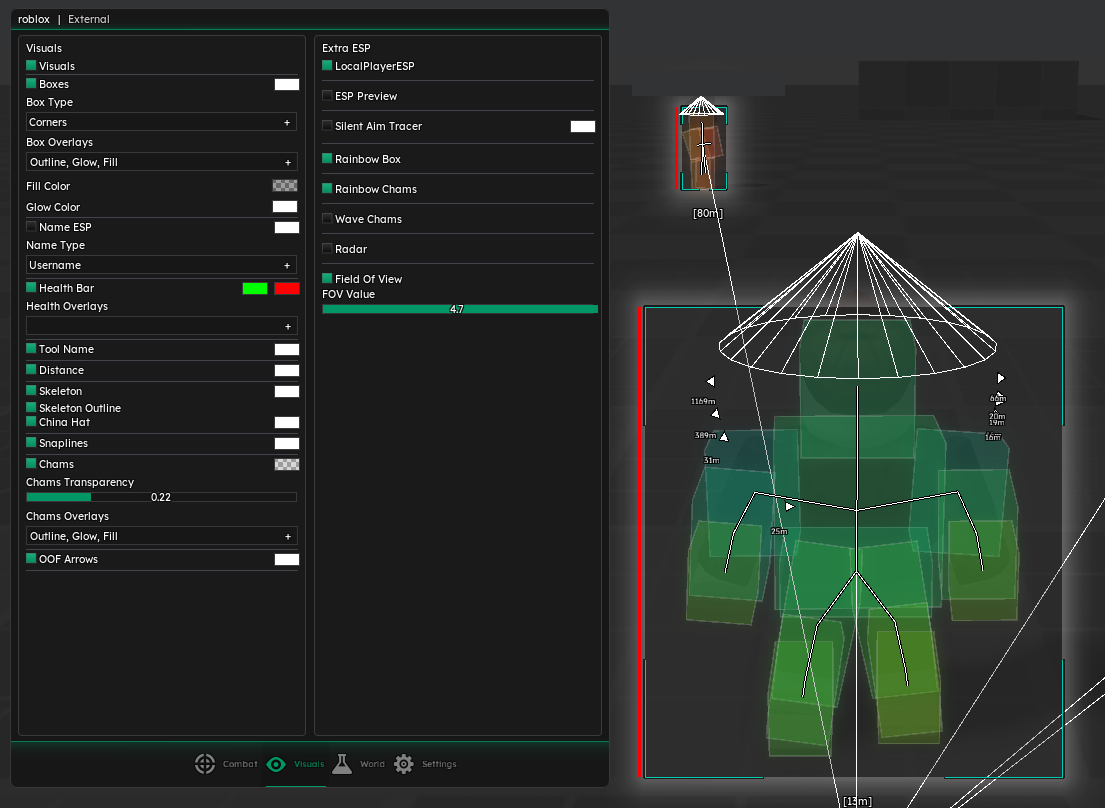
GoS for Roblox for 1 Week is the short-term access option for users who want to test the GamingOnSteroids Roblox external tool before choosing a longer pass. It includes the same main feature direction: combat settings, ESP visuals, world/player utilities, a modern menu and saved config support.
The weekly pass is best for testing. Use it to check the interface, review the demoed Roblox features, tune combat settings, try ESP visuals, test performance and decide whether the 1 month pass is a better fit for regular use.
What Is Included
GoS for Roblox uses a clean menu with sections for Combat, Visuals, World and Settings. This keeps aim-related features, ESP options, movement utilities and config controls separated so you can find settings quickly.
The 1 week product gives temporary access to the Roblox tool. The main difference from the monthly product is duration. It is built for users who want a lower-commitment way to inspect the features and build a first configuration.
Main Features
Combat tools such as silent aim, sticky aim, spoof mouse, hit chance, FOV, smoothing and prediction controls. Targeting and trigger options including closest-part targeting, team/wall checks and delay controls where supported. ESP visuals for boxes, corners, outline/glow/fill, health, usernames, distance, tool names, skeletons and snaplines. Radar-style awareness, off-screen arrows, tracers, local player ESP and FOV circle options. World/player utilities such as WalkSpeed, JumpPower, flight mode, freecam and other supported quality-of-life settings. UI settings for watermark, FPS counter, keybind list, VSYNC and adjustable crosshair. Config manager for saving, loading, deleting and refreshing profiles. Why Start With 1 Week
The 1 week pass is the lowest-commitment way to try GoS for Roblox. It is useful if you want to see how the menu feels, how the ESP looks, which combat options matter to you and how the tool performs on your system.
During the first week, the best approach is to keep the setup readable: enable only the visuals you need, tune FOV and smoothing carefully, then save a clean profile. If you decide the tool fits your use, the 1 month option gives better value for ongoing sessions.
Setup and Use Case
GoS for Roblox is strongest when configured around the specific Roblox experience you are playing. Some games benefit more from ESP and radar-style awareness, while others may make movement or UI tools more useful. Saved configs make it easier to keep separate setups instead of changing every option manually each time.
For more detail on every feature group, read the GoS Roblox detailed feature explanation.
About GoS for Roblox for 1 Week
GoS Roblox External - 1 Week Access
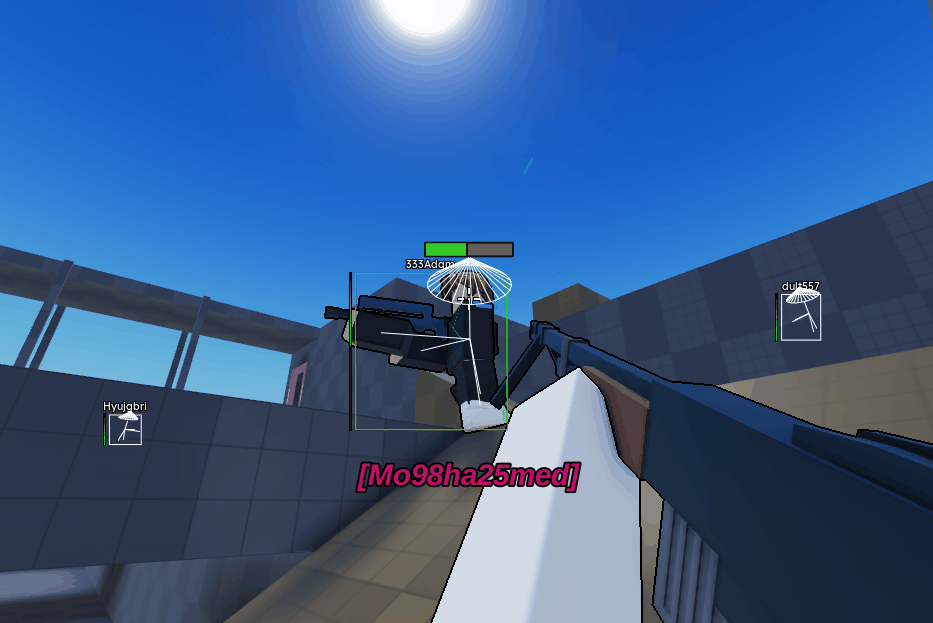
GoS for Roblox for 1 Week is the short-term access option for users who want to test the GamingOnSteroids Roblox external tool before choosing a longer pass. It includes the same main feature direction: combat settings, ESP visuals, world/player utilities, a modern menu and saved config support.
The weekly pass is best for testing. Use it to check the interface, review the demoed Roblox features, tune combat settings, try ESP visuals, test performance and decide whether the 1 month pass is a better fit for regular use.
What Is Included
GoS for Roblox uses a clean menu with sections for Combat, Visuals, World and Settings. This keeps aim-related features, ESP options, movement utilities and config controls separated so you can find settings quickly.
The 1 week product gives temporary access to the Roblox tool. The main difference from the monthly product is duration. It is built for users who want a lower-commitment way to inspect the features and build a first configuration.
Main Features
- Combat tools such as silent aim, sticky aim, spoof mouse, hit chance, FOV, smoothing and prediction controls.
- Targeting and trigger options including closest-part targeting, team/wall checks and delay controls where supported.
- ESP visuals for boxes, corners, outline/glow/fill, health, usernames, distance, tool names, skeletons and snaplines.
- Radar-style awareness, off-screen arrows, tracers, local player ESP and FOV circle options.
- World/player utilities such as WalkSpeed, JumpPower, flight mode, freecam and other supported quality-of-life settings.
- UI settings for watermark, FPS counter, keybind list, VSYNC and adjustable crosshair.
- Config manager for saving, loading, deleting and refreshing profiles.
Why Start With 1 Week
The 1 week pass is the lowest-commitment way to try GoS for Roblox. It is useful if you want to see how the menu feels, how the ESP looks, which combat options matter to you and how the tool performs on your system.
During the first week, the best approach is to keep the setup readable: enable only the visuals you need, tune FOV and smoothing carefully, then save a clean profile. If you decide the tool fits your use, the 1 month option gives better value for ongoing sessions.
Setup and Use Case
GoS for Roblox is strongest when configured around the specific Roblox experience you are playing. Some games benefit more from ESP and radar-style awareness, while others may make movement or UI tools more useful. Saved configs make it easier to keep separate setups instead of changing every option manually each time.
For more detail on every feature group, read the GoS Roblox detailed feature explanation.
There are no reviews to display.