
GoS:CS2 - 1 Month
GoS:CS2 - 1 Month is the longer access option for Counter-Strike 2 players who want the full GamingOnSteroids CS2 tool across regular sessions. It includes the GoS:CS2 menu with aimbot, triggerbot, ESP visuals, radar awareness, item tools, misc options and saved configuration profiles.
The monthly pass is the best choice if you already know you want to use GoS:CS2 for more than a quick test. It gives you time to tune aim settings, adjust visuals, create separate profiles and follow updates without needing to renew after a few days.
GoS:CS2 Overview
GoS:CS2 is organized around a clean in-game menu opened with INSERT. The current feature topic describes five main tabs: Aimbot, Visuals, Items, Misc and Configs. This structure keeps combat settings, visual information, item options and saved profiles separated so the menu is easier to scan during setup.
The product is built for users who want configurable Counter-Strike 2 assistance rather than one fixed setup. You can focus on subtle settings, stronger visibility, faster target reads or reusable configs depending on how you prefer to play.
Main Features
Aimbot controls for enable state, activation key, FOV, smoothing and target choice. Visible-only targeting options and FOV drawing for clearer aim setup. Triggerbot settings with activation key, reaction delay, cooldown and team checks. ESP visuals for boxes, skeletons, health, armor, distance, names and weapon display. Radar and awareness tools that help track enemy positioning more clearly. Item and skin-related options grouped by weapon type where supported. Misc options and configuration profiles for saving, loading and deleting setups. Aimbot and Triggerbot
The aimbot section focuses on control. FOV changes how wide the target detection area is around your crosshair, while smoothing changes how direct or gradual the movement feels. Target closest helps prioritize enemies nearest to the crosshair, and visible-only targeting keeps target selection tied to visible opponents.
The triggerbot settings are useful for users who want shot assistance with more timing control. Reaction delay and cooldown values let you adjust how quickly shots happen after a valid target appears. Team check helps prevent unwanted teammate targeting in supported situations.
ESP and Visual Awareness
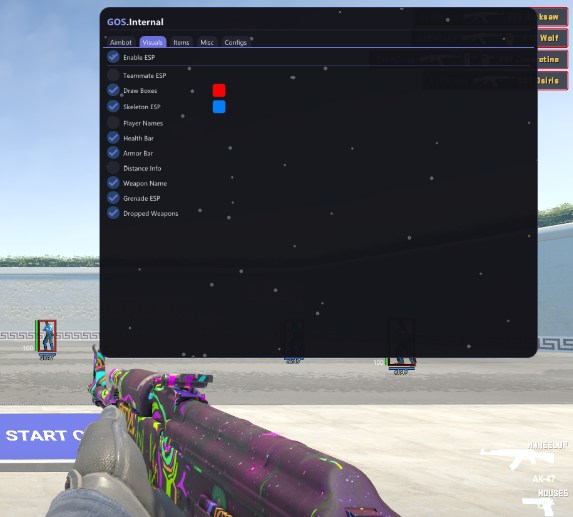
The visuals tab is one of the strongest parts of GoS:CS2. ESP options can display enemy boxes, skeletons, health, armor, distance, player names and weapons. These settings are useful because Counter-Strike 2 rounds are decided quickly, and clean information can make positioning and fight decisions easier to read.
Visual settings should be configured to match your screen, style and performance needs. Some users prefer minimal boxes and health, while others want a fuller information overlay. The point of the menu is that the setup can be adjusted instead of forcing one fixed visual style.
Configs and Monthly Value
The config system lets you save named profiles, load them later and delete old setups. This is useful if you want separate settings for different playstyles, maps, visibility preferences or testing sessions.
Choose the 1 month pass if you want better value and enough time to tune GoS:CS2 properly. For a short first test, the 1 week product is available, but monthly access makes more sense for regular CS2 use.
For the complete feature breakdown, read the GoS:CS2 detailed feature explanation.
About GoS:CS2 - 1 Month
GoS:CS2 Counter-Strike 2 Cheats - 1 Month Access
GoS:CS2 - 1 Month is the longer access option for Counter-Strike 2 players who want the full GamingOnSteroids CS2 tool across regular sessions. It includes the GoS:CS2 menu with aimbot, triggerbot, ESP visuals, radar awareness, item tools, misc options and saved configuration profiles.
The monthly pass is the best choice if you already know you want to use GoS:CS2 for more than a quick test. It gives you time to tune aim settings, adjust visuals, create separate profiles and follow updates without needing to renew after a few days.
GoS:CS2 Overview
GoS:CS2 is organized around a clean in-game menu opened with INSERT. The current feature topic describes five main tabs: Aimbot, Visuals, Items, Misc and Configs. This structure keeps combat settings, visual information, item options and saved profiles separated so the menu is easier to scan during setup.
The product is built for users who want configurable Counter-Strike 2 assistance rather than one fixed setup. You can focus on subtle settings, stronger visibility, faster target reads or reusable configs depending on how you prefer to play.
Main Features
- Aimbot controls for enable state, activation key, FOV, smoothing and target choice.
- Visible-only targeting options and FOV drawing for clearer aim setup.
- Triggerbot settings with activation key, reaction delay, cooldown and team checks.
- ESP visuals for boxes, skeletons, health, armor, distance, names and weapon display.
- Radar and awareness tools that help track enemy positioning more clearly.
- Item and skin-related options grouped by weapon type where supported.
- Misc options and configuration profiles for saving, loading and deleting setups.
Aimbot and Triggerbot
The aimbot section focuses on control. FOV changes how wide the target detection area is around your crosshair, while smoothing changes how direct or gradual the movement feels. Target closest helps prioritize enemies nearest to the crosshair, and visible-only targeting keeps target selection tied to visible opponents.
The triggerbot settings are useful for users who want shot assistance with more timing control. Reaction delay and cooldown values let you adjust how quickly shots happen after a valid target appears. Team check helps prevent unwanted teammate targeting in supported situations.
ESP and Visual Awareness
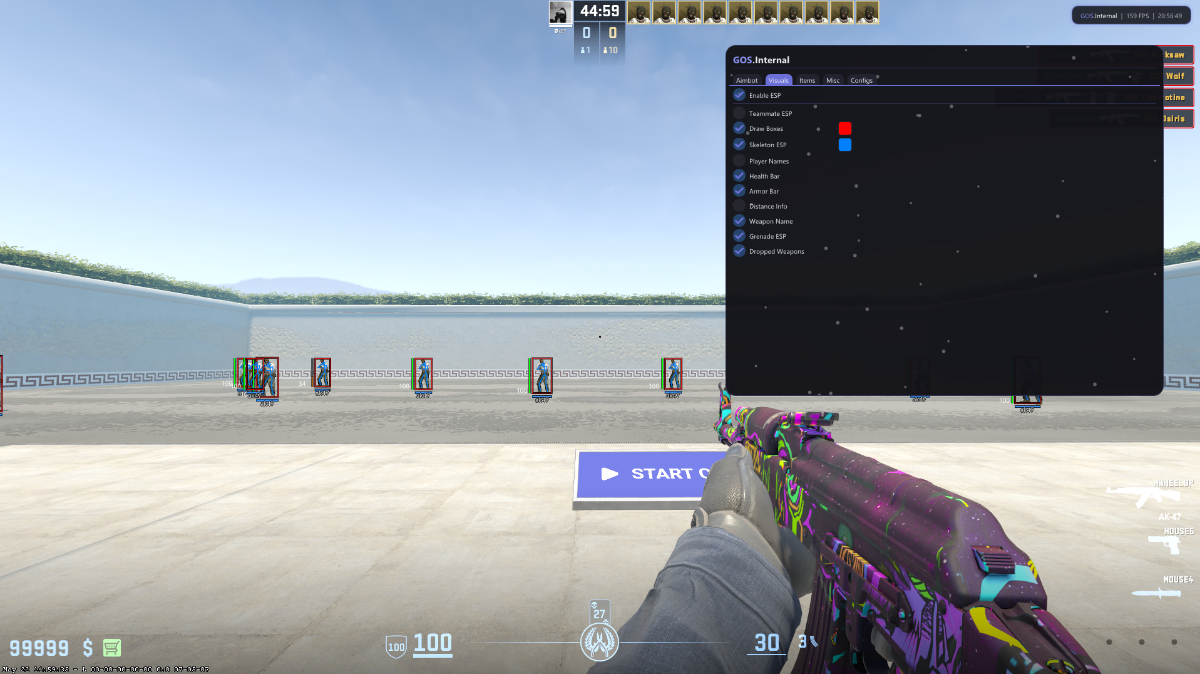
The visuals tab is one of the strongest parts of GoS:CS2. ESP options can display enemy boxes, skeletons, health, armor, distance, player names and weapons. These settings are useful because Counter-Strike 2 rounds are decided quickly, and clean information can make positioning and fight decisions easier to read.
Visual settings should be configured to match your screen, style and performance needs. Some users prefer minimal boxes and health, while others want a fuller information overlay. The point of the menu is that the setup can be adjusted instead of forcing one fixed visual style.
Configs and Monthly Value
The config system lets you save named profiles, load them later and delete old setups. This is useful if you want separate settings for different playstyles, maps, visibility preferences or testing sessions.
Choose the 1 month pass if you want better value and enough time to tune GoS:CS2 properly. For a short first test, the 1 week product is available, but monthly access makes more sense for regular CS2 use.
For the complete feature breakdown, read the GoS:CS2 detailed feature explanation.
There are no reviews to display.