
Feretorix
-
Posts
219 -
Joined
-
Last visited
-
Days Won
52
Content Type
Profiles
Forums
Events
Store
Everything posted by Feretorix
-
I can not pass around and ignore such a great post. First of all thank you for being around trough all this time and remembering the platform. I am in the serious thinking process of reworking EXTP once more and re-releasing it as EXTR as R at the end will stand for Revised & Reworked. The weak points of the current GOS is offset updating + proper maintenance of the core part. Next is going the whole luajit engine which is connected to the core. Next stop is developers creating all kinds of scripts + libraries - some of them great and others somewhat bloated and unreliable > all coming in a complete package. And recently since the introduction of VGK we are having another bypass and chain requirement. So here is the whole "chain". VGK Bypass > Core > LuaJit > LuaCodingPractices > FinalProduct Every ">" symbol represents a chain which "transfers" the work intact, anything that breaks in that chain results in a broken FinalProduct. And now for the potential solution, back to EXTR idea. I want to shorten the path to just a VGK Bypass > Core > FinalProduct = which will allow me to have a much shorter chain of events. Eliminating the lua part and embedding it directly to the core will also allow me to control the quality of the "scripts" and code mixture which will also boost performance. This was not a "good idea" back in the days, but today is a viable option with the help of AI, it can literally help you organize and implement huge amouts of code while allowing me to be the supervisor of the whole work process. So final verdict > I want to release a new version of EXTR while maintaining EXTP for as long as I can and make a smooth transition if more and more people are finally satisfied EXTR. It will concentrate on code speed, crash fixes and built in 90% of the time used stuff, like: 1) Orbwalker + lasthit + harass, all the usual SPACEBAR + CVX 2) AutoEvade which is finally built in the orbwalker which works in tandem at this point you're covering 50% of the scripting part 3) Introduce advanced awareness + jungle timers + autosmite and you're up to 70% 4) Finally introducing basic QWER spell combos for killing enemies could potentially bring us to a 80% 5) And maybe ... just maybe we could introduce a very concentrated API (again lua) which hopefully will not be crashing anything but instead just bring spell + buff + damage combo stuff, but this should be the cherry on top > bringing the product from the 80% up to 100% satisfaction point. Yet anyone who doesn't care about it will be receiving stability and decent features directly at the 80% mark. SO yes ... in the era of AI developers anything is possible. Let me know what do you think about this and let's see what others might think of it aswell.
-
 Verified and welcome back! :)
 -
You have been approved.
-
You are now approved.
-
Make Urself an Hackintosh! [No Vanguard]
Feretorix replied to czubaksamra's topic in League of Legends Community Scripts
Quite a lot of work actually, what benefits do people get on such a system? HWID Spoofing? What else? -
I have removed any auto-renewals and also did a full refund. Let me know if I can assist you in any other way.
-
It is fine, you are approved now.
-
You have been approved and now verified.
-
Since recently Claude Code released their top tier models like Claude Opus 5.5 - it is quite good at creating 3js videos with Code. Which means you are using only your own subscription credits allowance. But why use this tool? Isn't it possible to just tell to Claude "hey, here is a screenshot of a video, recreate the style and make a video with my own script". And here is where the big difference comes ... If you do it natively via Claude it will generate the video for you, but what if something is broken? You have to "pray" Claude understands what is broken and what you want to edit out to fix it up. With our editor you get a "timeline", in that timeline you get many small clips which you can edit separately, but what if something in a particular clip is broken? Maybe a text label is wrong? You just click on the text label inside the timeline and prompt Claude directly of that element and quickly fix the issue. I will post links to 3 videos which are made with the program, the first video is an explanation of almost all of the features and the other two videos are like "examples" of what the tool is able to do. I am planning on releasing the app very soon with a price tag between 50$ and 100$ per month. Let me know what do you think, it really lowers the barrier to creating shorts and long form faceless videos in unique styles consistently for creating YouTube content and getting monetized first before everybody else has the chance to do the same. Video presentation Vertical short video Long form video
-
Yes, but the method for unlimited usage is still not patched. Just plugin creation became somewhat more complicated. I have updated the tutorial and created a new refreshed video about it using AI. Also the Tunnel APP itself is updated so it shows actions, since often when I am using it myself, I'd run tasks for many long hours, the browser chat window can go stall or feel frozen, then It's good to check the connection in the GOS Unlimited Tunnel APP itself if any actions are being processed or it's inactive there too. Then I can safely restart/refresh the ChatGPT window or even start from a new chat... Chrome or any other browser likes eating the ram with long sessions. Good luck to everyone using it!
-
Approved.
-
Ok the Christmas tree with positive comments is just epic. I assume you took those from the Shoutbox and the Forum posts at the same time. And yes ... what a time to be alive ... this prediction is even better than the one promised in 4.0 for so long. Good job!
- 10 replies
-
- 3
-

-
- rocket league bot
- rocket league cheat
- (and 22 more)
-
Glad to see you enjoy it! :)
-
Maybe today... It has been 1 week after the patch so it's time now.
-
It was probably a miss-click on my end or it failed to update your account status. Now I have double-checked and you DO have access to the store page.
-
How come? Interesting .. ask codex to find using computer use where is "developer mode hidden". I will check it out later myself and update the tutorial. :) Thanks for notifying.
-
Approved. Approved. Approved.
-
Today the new patch has been released for 26.20. Please wait 3-4 days for the update to the free Discord tag access version to also update. In the new patch we will also add an option to do some windows modifications to resolve some of the errors so stay tuned up! Remember that if you want to purchase GOS EXTP premium, it works max on 23h2 and 22h2 is recommended to use.
-
Thank you for the report, I will put that to good use and try to release a new update very soon. What is your windows version? Is it Win11 25h2? (type in start menu winver to check)
-
Are you in Practice Tool when you start the tool? Can you post the full log before you get to the "searching process" part? When you "reboot the pc" and start EXTP for the first time it will show you a bigger log, can you copy and paste all the info you get here in a topic? This info will help me debug and solve it on your system. This applies to everybody else who is having a problem and wants it resolved.
-
Staying undetected in 2026 with EXTP.
Feretorix replied to Feretorix's topic in League of Legends Community Scripts
For now yes, but I am looking into a new way to "render" and it might get released soon. -
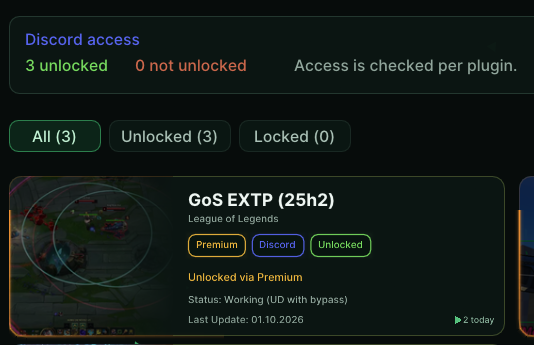
Currently outdated for 26.20 Patch, wait until 10th of October for a new update to this free test version. If you want to receive the update early and make a purchase for GOS EXTP, remember that it works on 23h2 and 22h2 with updates disabled. Win11 25h2 is not supported on the official version but is planned to be released very soon. You can use for free GOS EXTP (25h2) to test it on the latest windows version for a limited amount of time. The only requirement is following this tutorial in order to unlock it for free in GOS Loader: 1) Add at the end of your display name @gos.works 2) Login in GOS Loader using that same discord account 3) Profit ... download and launch gos EXTP and enjoy. Will appreciate your performance results on your system, meaning what is your windows, PC specs and how much FPS output you get from the overlay on average. Thank you!

-
Great release! Keep it up! What AI was used in the making of this?
-
For anybody doing "research" in game engines and reverse engineering in general will know that the top tier AI models are heavily restrictive and will hardly spit out anything interesting unless you are working in an offline proven "VM" env proving that you own the applications reversed ... and still it will be super defensive. When ox-alpha was released for free it got my attention and since the reveal it was the Z.ai's new flash model was the moment I tried their service. Indeed for less than a 20$ per month you can do a lot of stuff and they often near the weekend days give out 100% free usage, plus resets like Codex/ChatGPT desktop. While being really compliant, it's also worth to note that the flash model is close to GPT 5.4 / and the regular GLM-5.3 to GPT 5.5 at best. You can still do and code a lot of nice stuff with it especially if you guide it carefully and let it think out whatever it has to think for. So if you are in "reversing" and "coding" you have my recommendation to test it up. Especially since today I have released for my PREMIUM members the following Jailbreak, it is even more amazing:
-
I want to inform that everybody that posted got approved, thank you for participating!