
Heisa
-
Posts
156 -
Joined
-
Last visited
-
Days Won
30


.thumb.png.fccd7b16f18b4eced34e08e10302cf13.png)





About Heisa

Recent Profile Visitors
1,467 profile views




Heisa's Achievements





-
 Right now, they are built into the wave dash bot
- 10 replies
-
- 1
-

-
- rocket league bot
- rocket league cheat
- (and 22 more)
-
Hey everyone, for those of you who wished to support me, my patreon is up! https://www.patreon.com/cw/Heisa
Optional as always. Thank you! -
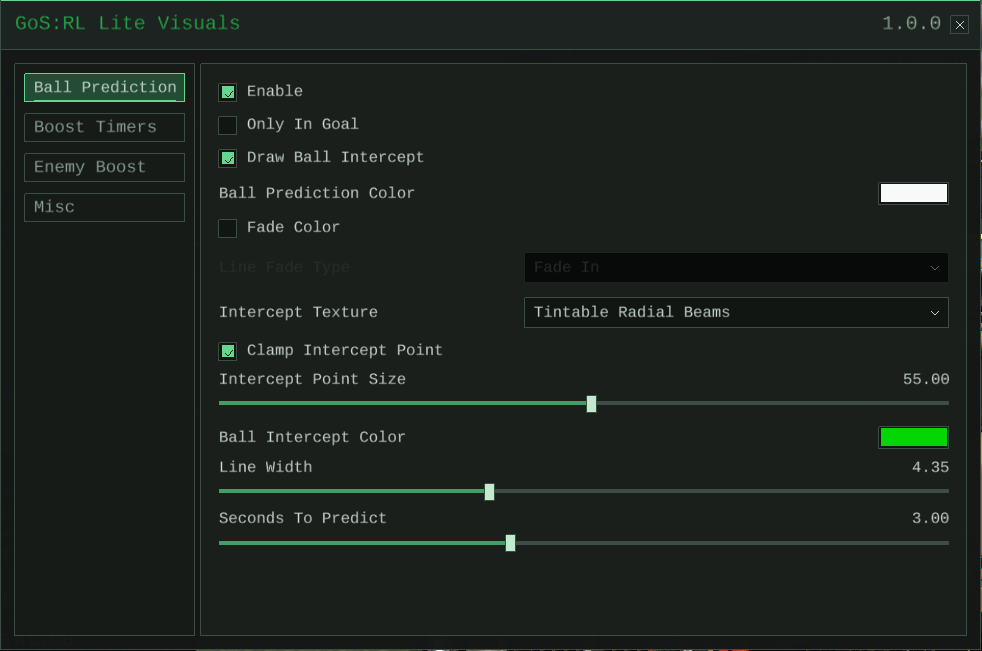
GoS:RL Lite Visuals v1.0.1, the complete visuals edition for Rocket League on Windows: engine-accurate ball prediction with a drawn aerial intercept marker, enemy boost, boost timers and Car Vision. BUY NOW! This is a public topic for newcomers who don't know what GoS:RL Lite Visuals is. GoS:RL Lite Visuals is the visuals edition of GoS:RL Lite for Rocket League on Windows. It reads the match live, predicts the ball with the game's own physics, and puts everything on your screen: the full predicted path, the intercept marker, boost timers on the pads, enemy boost on the nameplates, and enemy cars through the ball. It never touches your inputs. Nothing is driven for you, you keep full control. It is undetected under EAC right now, and updates are included. When Rocket League patches, we patch with it. You can get it for 9.99 EUR a week or 19.99 EUR a month, half the price of the full GoS:RL Lite. Direct store links are near the bottom of this post. What each edition includes Capability GoS:RL Lite Visuals GoS:RL Lite (full) Ball prediction and aerial intercept marker ✓ ✓ Enemy boost, Boost timers and Car Vision ✓ ✓ Automated aerial and ground controls – ✓ Wave Dash, Speed Flip and Zap dash automation and Demolition bot – ✓ It is the complete visuals edition: everything with a checkmark in the Visuals column is the full experience, running the same prediction engine as the full edition. GET FULL VERSION Highlights Native Ball Prediction Most prediction tools approximate the ball with a curve. GoS:RL Lite Visuals runs the game's actual physics instead: the same collision shapes, materials, spin and drag your match uses. It follows the ball with only very small errors, so the line you see is where the ball is really going. It covers Soccar, Heatseeker, Dropshot, Hoops, Snow Day, Pinball, Boomer Ball, Beach Ball, Super Cube, Moonball, Gridiron, Split Shot (both its Snow Day and Heatseeker versions) and even the Eggstra Special Mode. You can keep it simple with Only In Goal, or draw the full path and adjust color, texture, line width, fade in and fade out, and how many seconds ahead to predict. Online, the server owns the ball. The prediction follows the server's ball closely, but the server always gets the last word. Heatseeker Dropshot Split Shot Snow Day Super Cube Beach Ball Boomer Ball Boost Timers and Enemy Boost Boost pad respawn timers for both sides, and enemy boost drawn right on the nameplates. Quiet and easy to read. Car Vision Renders enemy cars through the ball and other geometry when they are close to it, so you can read the challenge behind the ball. There is an optional 300 to 1200 distance gate. Your own car stays normal. Menu & Config The menu opens with Insert by default. Mouse wheel scrolls long tabs, Ctrl-click edits exact values, and holding Backspace repeats. The menu hotkey can be rebound in a few keypresses, and everything saves to config. Everything included as of now: Ball Prediction Rendered prediction path. Only In Goal mode if you only care whether the ball is going into a goal. Draw Ball Intercept option which shows you where you can hit the ball on its predicted path. Prediction color, intercept texture, intercept point size and intercept color. Clamp Intercept Point keeps the intercept marker on screen: targets behind the camera pin to the screen edge. Fade color toggle plus Fade In and Fade Out line modes. Line Width and Seconds To Predict settings. Custom collision engine for walls, ramps, corners and goal frames, plus the rims, pucks, cubes and beach balls of the special modes. Stays accurate through goals, kickoffs, training resets and map changes. Mode-specific prediction Soccar: walls, ramps, corners and goal frames behave like the real field, so bounces, curves and pinches keep the line true. Hoops: rims and nets are real surfaces, so rim rattles, net bounces and awkward angles all show up on the line. Dropshot: broken tiles leave holes with sharp angled edges, and the prediction reads the live tile state, so the ball can clip an edge or drop through a hole exactly like in play. Heatseeker: the ball hunts the net, speeds up with every touch, and can kick off the backboard, switch sides and fire back. The prediction reads the live rules and includes the backboard redirect. Small differences can show up online, because the server decides what happens to that ball. Beach Ball: the light ball curves on its own, spin cap included, so the line bends with it. Boomer Ball: fast-ball Soccar. The prediction tracks the faster pace, so the line stays true up to the last bounce. Split Shot Snow Day: the puck barely loses speed and loves the walls, and the prediction follows its flat, sliding behavior. Super Cube: flat faces, sharp edges and tumbling bounces, all followed exactly. The path stays correct even while the cube spins. And others... Boost Timers Tracks boost pad recharge and draws timers over the pads. Enable toggle, circle display with texture and size, text countdown with size and color, and a Z Position setting that controls both circle and text height. Big boosts respawn after 10 seconds. Timers hold up through demos, respawns, goals, kickoff resets and team switches while pads are still regenerating. Enemy Boost Shows estimated enemy boost in game, either as a bar under the car or on the nameplates. Optional amount text, thicker and easier to read. Nameplate bars can hide player names, and the boost text centers when names are off. Nameplate Transparency slider (0 is fully opaque, 100 hides it). Normal Bar settings: width, height, X and Y offsets. Nameplate Bar settings: X and Y scale, padding, X and Y offsets, Show Names, text scale, and separate offsets for the amount text. The nameplate overlay follows Rocket League's own nameplate scale, so you can adjust the final size in the game settings too. Car Vision Optional 300 to 1200 distance gate for rendering enemy cars through the ball and other geometry. Your own car stays normal. Lives in the Misc tab. Menu & Config Menu opens with Insert by default, and the menu hotkey can be changed. Misc tab included. Mouse wheel scrolling, left and right click blocking behind the menu, Ctrl-click exact value editing, and held Backspace repeat. Config saves locally. Hotkeys save with the visible names from the UI. Version history v1.0.1 (October 2026) Updated for game patch v2.78. v1.0.0 (October 2026) First release of the visuals edition. The prediction engine is the same one that powers the full GoS:RL Lite, so improvements to prediction ship to both editions. Safety concerns Injector and GoS:RL Lite Visuals have been tested and undetected under EAC since around 01/09/2026. Be careful anyway, and never use accounts you really care about. The v1.0.1 build was tested thoroughly and safe from 10/10/2026. Keep the same caution while using it. If you worry about your machine HWID, feel free to use any spoofer before launching Rocket League. Security status, updates and discussions remain private in the forum section once you purchase. Get GoS:RL Lite Visuals 1 Week: 9.99 EUR. Store page 1 Month: 19.99 EUR. Store page Both are in the Rocket League category of our Store. Renewals, payment methods and receipts are under Manage Purchases in your account menu. Updates and support are included. FAQ Steam/Epic? Yes.. Is it undetected? Yes, under EAC at the moment. See the Safety concerns section above, and keep using accounts you can afford to lose. What happens when Rocket League updates? We update with it, and existing subscriptions get the new builds. Does it include the aerial bot and dash automation? No. GoS:RL Lite Visuals is prediction, boost and vision only. The automation is in the full GoS:RL Lite, and the table near the top shows the difference. How do hotkeys work? The menu hotkey can be rebound, and it saves to config. Gameplay automation hotkeys belong to the full edition. Where do I get support? Post in our forums.

-
- 4
-

-
- rocket league bot
- rocket league cheat
- (and 18 more)
-
This issue happens only on Steam build. Please use epic games for the time being
-
GoS:RL Lite v1.3.5, an engine-accurate ball prediction and aerial bot for Rocket League on Windows. BUY NOW! This is a public topic for newcomers who don't know what GoS:RL Lite is. GoS:RL Lite is a helper tool for Rocket League on Windows. It reads the match live, predicts the ball with the game's own physics, and takes over specific actions when you ask: aerials, air dribbles, demos, wave/wall/zap dashes. You keep the wheel, and it handles the inputs you delegate. It is undetected under EAC right now, and updates are included. When Rocket League patches, we patch with it. You can get it for 19.99 EUR a week or 39.99 EUR a month. Direct store links are near the bottom of this post. Highlights Native Ball Prediction NEW IN 1.3.0 Most prediction tools approximate the ball with a curve. Lite runs the game's actual physics instead: the same collision shapes, materials, spin and drag your match uses. It follows the ball with only very small errors, so the line you see is where the ball is really going. It covers Soccar, Heatseeker, Dropshot, Hoops, Snow Day, Pinball, Boomer Ball, Beach Ball, Super Cube, Moonball, Gridiron, Split Shot (both its Snow Day and Heatseeker versions) and even the Eggstra Special Mode. You can keep it simple with Only In Goal, or draw the full path and adjust color, texture, line width, fade in and fade out, and how many seconds ahead to predict. Online, the server owns the ball. The prediction follows the server's ball closely, but the server always gets the last word. Heatseeker Heatseeker_wm.mp4 Dropshot Dropshot_wm.mp4 Split Shot Snow Day Splitshot snowday_wm_small.mp4 Super Cube Super Cube_wm.mp4 Beach Ball beach ball_wm_small.mp4 Boomer Ball Boomer ball_wm.mp4 Aerial Bot Hold a key and the car flies the aerial for you. There are six mode profiles: Always Freestyle, Freestyle, Freestyle 2, Normal, Redirect and Strict. Each one keeps its own settings and its own hotkey slot. Aim at Goal searches for real scoring car states, including Heatseeker physics as of v1.3.0+, Auto Boost handles your boost, and the final orientation controls decide how the car rotates into the ball. Freestyle aerial + redirect Freestyle Aerial Bot + Redirect mode_wm.mp4 Aerial Bot + Redirect Mode, captured from the rear view camera. Made to impress the spectators Rear view camera Aerial Bot + Redirect mode_wm.mp4 Flip Reset and Flip Reset 2 NEW IN 1.3.0 Two dedicated reset modes. Flip Reset turns the car so the wheels face the predicted ball during the final approach. Flip Reset 2 goes further: it positions the car so the wheel side actually meets the ball, and it reads your dodge window to decide when to leave the reset pose. It also adds three settings of its own (Alignment, Auto Reorient and Reorient Only After Reset). Both modes are available as final orientations, and Flip Reset 2 also works on normal and strict air dribble finals. Air dribble into Flip Reset 2, finished with a manual dodge at the end Air Dribble + Flip Reset 2_wm.mp4 Air Dribbling Air dribbling is carrying the ball through the air: you lift it off the wall or the ground, then stay right underneath it with small controlled touches, nudging it toward the goal. The whole trick is staying under the ball without popping it too far ahead, which is what makes it hard to do consistently. That carry is what the bot takes over. It keeps the car under the ball and steers toward the goal opening, with forward and lateral correction sliders setting how far it can adjust underneath. Air Dribble 2_wm.mp4 Demolition Bot NEW IN 1.3.0 Hold it and the car chases the closest enemy ahead on your current surface: floor, side wall or floor to wall routes. It predicts their turning, throttle, boost and wall gravity, so it tries its best not run past them. Has its own tab, with a hold hotkey that can be rebound (LeftControl by default). Demolition Bot_wm.mp4 Wave Dash / Wall Wave / Zap Dash / Recoveries A movement tab for wave dashes and wall dashes, with orient-only or continuous modes, dodge direction control, cooldowns and a hold hotkey. Hold the hotkey and it can also do speed flips, and the recoveries help you land back on your wheels. Wave dash: a dodge triggered right as the wheels touch the ground. The ground cancels most of the flip motion, so you keep the speed burst without committing to a full flip. It is the go-to for fast recoveries and low-boost rotations. Wall dash: the same trick along walls and wall exits, chained dash after dash to keep your pace while re-entering the field from the side wall. Zap dash: the timing-heavy version popularized by 1v1 player aZapatos. You land without a flip, the nose tips down slightly, the front wheels pop up first, and you snap a wave dash off that bounce for a bigger burst than a normal wave dash. The bot handles the timing. The Wall Wave and Zap Dash clips below were recorded in GoS:RL V4, which is was never released due to EAC. It runs the same dash code as Lite, so what you see is what you get. Wall wave dashing Wall Wave Dashing_wm.mp4 Zap dashing Zap Dashing_wm.mp4 Boost Timers and Enemy Boost Boost pad respawn timers for both sides, and enemy boost drawn right on the nameplates. Quiet and easy to read. Car Vision NEW IN 1.3.0 Renders enemy cars through the ball and other geometry when they are close to it, so you can read the challenge behind the ball. There is an optional 300 to 1200 distance gate. Your own car stays normal. Menu & Config The menu opens with Insert by default. Mouse wheel scrolls long tabs, Ctrl-click edits exact values, and holding Backspace repeats. Hotkeys bind in a few keypresses, every aerial mode keeps its own profile, and all of it saves to config. Everything included as of now: Ball Prediction Rendered prediction path. Only In Goal mode if you only care whether the ball is going into a goal. Draw Ball Intercept option which shows you where you can hit the ball on its predicted path. Prediction color, intercept texture, intercept point size and intercept color. Fade color toggle plus Fade In and Fade Out line modes. Line Width and Seconds To Predict settings. Custom collision engine for walls, ramps, corners and goal frames, plus the rims, pucks, cubes and beach balls of the special modes. Stays accurate through goals, kickoffs, training resets and map changes. Mode-specific prediction Soccar: walls, ramps, corners and goal frames behave like the real field, so bounces, curves and pinches keep the line true. Hoops: rims and nets are real surfaces, so rim rattles, net bounces and awkward angles all show up on the line. Dropshot: broken tiles leave holes with sharp angled edges, and the prediction reads the live tile state, so the ball can clip an edge or drop through a hole exactly like in play. Heatseeker: the ball hunts the net, speeds up with every touch, and can kick off the backboard, switch sides and fire back. The prediction reads the live rules and includes the backboard redirect. Small differences can show up online, because the server decides what happens to that ball. Beach Ball: the light ball curves on its own, spin cap included, so the line bends with it. Boomer Ball: fast-ball Soccar. The prediction tracks the faster pace, so the line stays true up to the last bounce. Split Shot Snow Day: the puck barely loses speed and loves the walls, and the prediction follows its flat, sliding behavior. Super Cube: flat faces, sharp edges and tumbling bounces, all followed exactly. The path stays correct even while the cube spins. And others... Boost Timers Tracks boost pad recharge and draws timers over the pads. Enable toggle, circle display with texture and size, text countdown with size and color, and a Z Position setting that controls both circle and text height. Big boosts respawn after 10 seconds. Timers hold up through demos, respawns, goals, kickoff resets and team switches while pads are still regenerating. Enemy Boost Shows estimated enemy boost in game, either as a bar under the car or on the nameplates. Optional amount text, thicker and easier to read. Nameplate bars can hide player names, and the boost text centers when names are off. Normal Bar settings: width, height, X and Y offsets. Nameplate Bar settings: X and Y scale, padding, X and Y offsets, Show Names, text scale, and separate offsets for the amount text. The nameplate overlay follows Rocket League's own nameplate scale, so you can adjust the final size in the game settings too. Aerial Bot Six mode profiles plus per-mode settings, driven by the held hotkey. Hotkey defaults: Primary F, Secondary G, Third Space, Fourth B. Default modes: Freestyle, Strict and Redirect, with Strict for air dribbling. Fast aerial turn controls that favor pitch and roll over slow yaw turning. Every aerial mode has hotkey and config support. Final Orientation Sets how the car rotates before it reaches the ball. Final Orientation Mode options: Normal, Strict and Redirect. Air dribble finals use Normal and Strict. Final Orientation Distance decides how close the car gets before it enters the final orientation, and Extra Reorient Time adds time on top. Redirect works best when the ball is moving toward you. It can struggle when you and the ball move together toward the enemy goal, and it still plays by the game's physics. One tip: when you are aerialing close to the ball, stop boosting as soon as the bot starts orienting. It takes a little getting used to. Dodge Protection Time Replays your own jump input on the dodge frame, so the bot cannot overwrite your dodge direction. Time based, so it stays consistent at very high FPS. Aerial Modes Always Freestyle: the most freestyle-focused mode, keeping freestyle behavior aggressive. Freestyle and Freestyle 2: the main freestyle modes. Freestyle is the Primary default, and Freestyle 2 is a second preset for a different setup. Normal: cleaner aerial behavior with less freestyle logic. Redirect: redirect-style touches, best when the ball is moving toward you. Strict: focused on air dribbling and clean controlled touches. Flip Reset and Flip Reset 2: the two reset modes described above. Per-mode settings include Final Orientation, Final Air Dribble Orientation Mode, Final Orientation Distance, Extra Reorient Time, Air Dribbling Max Forward and Max Lateral Correction, Aim at Goal, Auto Boost, Freestyle Roll Angle, Freestyle Air Roll Direction, and Take-off controls. Right-click an Aerial Mode button to set it as Primary, Secondary, Third, Fourth or the Air Dribbling mode. Right-click again to clear it. Flip Reset 2 settings, shown when Flip Reset 2 is the mode or the final orientation: Alignment Degrees (default -10, range -40 to +40), Auto Reorient (default On) and Reorient Only After Reset (default On, needs Auto Reorient). Reset Reorient Distance and Extra Reset Reorient Time replace the usual final orientation timing sliders. Air Dribbling Max Forward and Max Lateral Correction control how much the bot can adjust its target under the ball. Final Air Dribble Orientation Mode can be used where supported, and the mode can be assigned from the Aerial Modes buttons. Strict is the default air dribbling mode, kept cleaner to avoid unnecessary touches. It steers the carry toward the goal opening, and the pickup reach is roughly doubled for balls below, beside or behind the car. Reaching the side of the ball no longer cancels the turn. Your old slider values may need adjusting. Auto Drive New steering controller that can climb walls without a full pathfinder. Picks a simple drive target from the aerial intercept, using the closest useful surface. Slows down only when the turn needs it, and matches speed to the ball when aerialing (semi-working, and I would still drive myself for now). Wall and ceiling routes only take over near an actual transition, and it avoids weird opposite surfaces. Auto Drive is a toggle in the Aerial Bot tab. Draw Ground Debug can show the route it is trying to use, and it gets out of the way better during takeoff. Aim at Goal Per Aerial Mode. The toggle turns the whole behavior on or off for that mode. Aerial Pitch, Yaw and Roll ranges control how far the search can rotate the car while looking for a better contact. Positions Around Ball sets how many contact positions are checked. Higher finds better hits but costs more. Refinement Iterations improve the chosen contact at extra cost. Use When Aerialing, with Aerial: Facing Goal and Aerial: In Safety Zone conditions. Ground: Facing Goal and Ground: In Safety Zone handle ground checks. Safety Zone Distance is measured from the enemy goal center toward the middle of the field, so higher values pull the safety zone further back. Search range values: 1.0 is full rotation on the axis, 0.75 is wide, 0.5 is medium, 0.25 keeps close to the default orientation, and 0.0 disables search on that axis. Aim at Goal controls can gray out when the mode is being used as the active air dribbling mode. Heatseeker support: the hit search uses the ball's live Heatseeker physics, so the hit it picks matches what the ball will actually do when your car touches it. Auto Boost Simple boost helper, enabled per Aerial Mode. Your own boost input takes priority, and the bot will not release boost while you are holding it. Wave Dash / Wall Wave / Zap Dash / Recoveries Enable toggle, hotkey, and an Orient Only mode that lines the car up without forcing the dash. Orient Towards Ground for landing-surface setup, and Jump On Ceiling for ceiling dashes. Zap Dash enable. It is more timing sensitive than a normal wave dash and depends on contact, suspension, rebound and jump timing. Continuous Mode with a jump-type selector keeps looking for chances while the hotkey is held. Wall Dashing with a speed limit, an adaptive cooldown that scales with your speed, and a cooldown between attempts. Dodge Direction controls the dodge used during the dash. Zap Dash can behave differently in Dropshot because the car physics there are slightly different. Occasional tumbles on that map are a known issue. Demolition Bot Dedicated tab with a compact chase mode. The hold hotkey defaults to LeftControl and can be rebound with the tab's button. Hold the key to chase the closest enemy ahead on your current surface. Side wall and floor to wall routes stay surface-relative. Predicts the target's turning, throttle, boost and wall gravity, and keeps a pursuit point when the intercept is not directly reachable. Car Vision Optional 300 to 1200 distance gate for rendering enemy cars through the ball and other geometry. Your own car stays normal. Lives in the Misc tab. Hotkey Binding Press a key to bind it. Left mouse is ignored, Escape cancels, and the old hotkey stays if you cancel. Any recognized game key can be bound, including joysticks/gamepads as long as the game recognizes it. Menu & Config Menu opens with Insert by default, and the menu hotkey can be changed. Misc tab included. Mouse wheel scrolling, left and right click blocking behind the menu, Ctrl-click exact value editing, and held Backspace repeat. Config saves and loads locally. Hotkeys save with the visible names from the UI. Version history v1.3.5 (October 2026) Updated for game patch v2.78. v1.3.4 (October 2026) The selected intercept no longer lands past the goal line. When a timed hit cannot be reached, wall and floor pursuit now stays active so the car keeps chasing instead of stalling. Fixed the car stopping short when approaching incoming balls. Sideways wall approaches now keep enough wheel motion to turn toward a floor target. v1.3.3 (October 2026) New Clamp Intercept Point option for Ball Prediction (on by default): the intercept marker stays on screen, and targets behind the camera pin to the screen edge. New Seconds To Predict Outcome setting for Aim at Goal (per mode), used to evaluate where the ball goes after your touch. New per-mode Heatseeker Aerial Pitch, Yaw and Roll Range sliders. Ground Aim at Goal fixes: works with stationary balls, exact contact for sideways cars, and correct contact for Beach Ball and other resized balls. Improved aerial routing: route choices compare total drive and arrival time, and surface strikes are checked against the car’s real hitbox reach. Prediction results refresh when the play changes, so stale forecasts no longer linger. Updated Ball Prediction defaults, and a smaller, faster-loading build. v1.3.2 (October 2026) Reworked ground speed before aerials: the bot now uses the available runway and brakes into the right takeoff speed instead of stopping under nearby balls. Floor to wall approaches no longer brake under high wall targets. Fixed half-turn reorientation when facing away from the ball, including wall takeoffs. Fixed the Draw Ground Debug option under Auto Drive. v1.3.1 (October 2026) New Nameplate Transparency slider for Enemy Boost (0 is fully opaque, 100 hides it). Dodge Protection Time is now a per aerial mode setting (12.50 ms default, 0 disables it). Your held boost now always passes through in aerial modes; airborne Auto Boost behaves as before. Ball Prediction now initializes correctly on Steam builds. v1.3.0 Major Update (October 2026) Native, engine-accurate ball prediction across almost all modes. Flip Reset and Flip Reset 2 aerial modes, both also as final orientations. Demolition Bot with its own tab and a hold hotkey. Car Vision for enemy cars, in the Misc tab. Heatseeker support for Aim at Goal. New air dribble carry with doubled pickup reach. Hotkey labels in the mode menus and updated tuned defaults. v1.2.4 (September 2026) Maintenance update for the latest Rocket League build, keeping the controller, vehicle and input layouts in sync. v1.2.3 (August 2026) Updated for the newest Rocket League build, with refreshed car and ball layouts plus Hoops detection, and small internal fixes. v1.2.2 (July 2026) Prediction fixes for retail builds across launchers, and internal cleanups that trimmed the tool's footprint. v1.2.1 (June 2026) The detection update. After a banwave hit older versions, this build reworked the internals and the way it injects; in testing it stayed safe for far longer than previous versions. It also fixed Aim at Goal across the final orientation modes, corrected Hoops and Dropshot contact behavior, and fixed a wave dash throttle that could get stuck. v1.2.0 (June 2026) The Aerial Modes update. Always Freestyle, Freestyle, Freestyle 2, Normal, Redirect and Strict became real profiles, each with its own settings, its own hotkey slot and right-click assignment. The Wave Dash tab arrived with Orient Only, Wall Wave Dashing, Zap Dash, ceiling dashes and adaptive cooldowns, Auto Boost showed up, Hoops and Dropshot prediction became semi-supported, and the menu gained mouse wheel scrolling, Ctrl-click exact values and held Backspace repeat. v1.1.1 (June 2026) Dodge Protection Time switched from frame ticks to milliseconds, so high-FPS players keep the same protection window. Also fixed the Aerial Bot stopping after long sessions and nameplate boost bars not covering long names. v1.1.0 (June 2026) The Aerial Bot update. Redirect and Strict aerial modes launched with air dribbling offset controls, Auto Drive groundwork, the Aim at Goal scoring search and the Press Key hotkey flow. Ball Prediction gained the intercept marker with textures and colors plus fade in and out line modes, and the boost overlays got their first big polish. v1.0.0 Where it started: Ball Prediction with its own field collision engine working on any map, Boost Timers, the nameplate Enemy Boost overlay, and the in-game menu with config saving to TARLBotSettings.ini. Soccar only at launch. Safety concerns Injector and GoS:RL Lite have been tested and undetected under EAC since around 01/09/2026. Be careful anyway, and never use accounts you really care about. The v1.3.5 build was tested thoroughly and safe from 09/10/2026. Keep the same caution while using it. If you worry about your machine HWID, feel free to use any spoofer before launching Rocket League. Security status, updates and discussions remain private in the forum section once you purchase. Get GoS:RL Lite 1 Week: 19.99 EUR. Store page 1 Month: 39.99 EUR. Store page Both are in the Rocket League category of our Store. Renewals, payment methods and receipts are under Manage Purchases in your account menu. Updates and support are included. What users say "loving it so far!" @vetoxin "Now this, is legendary." @Wubble "Holy Moly, this is sickk" @puffy88 "Seems to be working, nice job." @xivaely "You are the best, ever. I can't wait to try." @stickyonestill "Your work over the years has always been excellent." @Ruger44 "hahah dude u coocked i played now for 2hrs its amazing" @iAutre "Its been safe since last safety update still going well." @Aristo "Not since the last security update! almost for a month now!" @Rodrighinni "I'm really looking forward to it, I've been using Gos RL for two years now." @ImBrokz "You absolutely deserve additional support. It will be a pleasure to contribute." @muraioshino "I've been here for a couple of years and had an active sub during the eac implementation." @Geo "Always great to see how GOS was great as is, and now with a complete overhaul this could make this into something better." @jeeeko "Testing right now and it is insanely smooth. Prediction just feels much more accurate than even v3. Boost timers in nametags are very useful and creates less clutter. Amazing responsiveness." @camden411 FAQ Steam/Epic? Yes.. Is it undetected? Yes, under EAC at the moment. See the Safety concerns section above, and keep using accounts you can afford to lose. What happens when Rocket League updates? We update with it, and existing subscriptions get the new builds. How do hotkeys work? Every aerial mode gets its own hotkey slot and its own settings, and everything saves to config. There are currently 4 hotkeys which can be assigned to aerial modes. Where do I get support? Post in our forums.
- 10 replies
-
- 8
-
-
-
- rocket league bot
- rocket league cheat
- (and 22 more)
-
Thanks for sharing! Just fyi, Demolition Bot is currently bugged and I'm working on fixes for it as we speak.
-
Has anyone been detected using gos?
Heisa replied to Madbcbad's topic in Rocket League Hacks and Bots
Apply here for access. Once approved you would see it in the store -
Heisa changed their profile photo
-
Operative Combat Routine Concealment, Lethality, and Medicine for GoS: SWTOR Core Current runtime support: Imperial Agent Operative only. Scoundrel names below are a future-support mirror reference, not a supported route. Support Status The current Lua is Operative-only. The dispatcher requires combat_style == "operative" and the exact Operative discipline names Concealment, Lethality, or Core's authoritative Medic value. It does not translate Scoundrel loadouts, abilities, effects, casts, or combat events. Scrapper, Ruffian, and Sawbones are therefore not runnable today. Their mirror names are retained and corrected in this topic so a future implementation has an accurate reference. Coverage: all three Operative modules are capability-driven through level 80. The route reads owned abilities, passives, and choices from the live loadout instead of inferring them from level. Fail-closed loadout gate: the combat route waits when the style, discipline, loadout, ability, effect, resource, target, or required geometry is unavailable. One executor: the top-level dispatcher owns one shared AbilityExecutor, polls it once per tick, and passes it to every route and utility. Current-target DPS: Concealment and Lethality use the selected hostile target. Medicine chooses friendly patients independently and never changes the visible selection to heal. Manual ownership: Evasion, Cloaking Screen, Flash Bang, Infiltrate, and other major defensives or crowd-control actions stay player-owned unless a specific behavior below says otherwise. Executor, Scheduling, And Targeting Hold-to-run: normal rotation, cleanse, interrupt, and DPS self-healing work only while Rotation Key is active. Auto Stealth may be configured to work without the key. Stealth-detector awareness and the cursor Holotraverse gesture are separate from the rotation key. Dispatcher order: after the one executor poll, the script updates combat evidence, draws Medicine actions when applicable, services cursor Holotraverse, then the shared interrupt. Route-owned pending admission is serviced before new work. DPS cleanse, DPS self-heal, Auto Stealth, and the selected discipline route then take their defined turns. One request at a time: an accepted command owns the executor until Core reports its lifecycle terminal. Admission-pending means “retry this exact intent next tick,” not success or failure. A route cancels only a command carrying its own exact ownership prefix. No target fallback: explicit friendly, cleanse, interrupt, cursor, and Concealment casts require the requested handle and target_fallback="none". Contract mismatches are rejected. Lethality deliberately uses Core's captured selected-target path and verifies that no override or fallback occurred. Selection changes: Lethality releases only its own cancellable selected-target command when the selection changes. Medicine re-resolves friendly handles before retrying admission. Life-saving/burst healing stays pinned to the endangered patient instead of silently healing a healthier fallback. Action timing: the Lua queue window controls when normal actions may be offered. Core remains authoritative for cooldown, resource, range, facing, line of sight, target state, native result, and cleanup. AoE counts: automatic counting uses bounded target-centered, player-centered, or cone geometry as appropriate. Manual Relevant Targets replaces only the quantity when automatic counting is disabled; it never overrides missing range/facing geometry or observed breakable crowd control. Controls The settings card is discipline-aware. Ability-gated controls appear only when the current loadout owns the required ability. Defaults below are the current Lua defaults. General, Energy, And Logs Control Default Behavior Rotation Key Mouse 4 Hold to run the combat scheduler. Ability Queue Window 0.20 s Normal-action queue lead; range 0.05-0.50 s. Energy Floor % 60% DPS paid-action reserve; range 35-90%. Auto Stim Boost On DPS reserves it for worthwhile targets; Medicine may use it for emergency TA or Stim Burst healing windows. Auto Adrenaline Probe / Adrenaline Probe At % On / 40% Automatic Energy recovery. During active Medicine pressure, the route will not wait below 40% even if a lower threshold is configured. Cast Log On Logs commands accepted by the Lua/Core submission path. It is not proof that the game activated them. Decision Log Off Rate-limited route choices, waits, gates, admission retries, and cursor outcome diagnostics. Ability Diagnostics Off Rate-limited owned/bound/resolved/ready/cost and command-state detail for the selected route. AoE And Damage Target Counting Control Default Behavior Automatic AoE On Enables discipline AoE priorities. Target-Centered Auto Count On Uses live hostile geometry for AoE decisions. Relevant Targets 1 Manual count, 1-8, used only when automatic counting is disabled; real geometry remains mandatory. AoE Minimum Targets 3 Minimum clustered hostiles, range 2-8. AoE Cluster Radius 5 m Target-centered count radius, range 3-8 m. Ability-specific footprints still govern each cast. Corrosive Dart Refresh 1.5 s Owned DoT refresh window, range 0-3 s. DPS Self-Healing Control Default Behavior DPS Self-Healing On Master switch for Concealment/Lethality self-care; Medicine is excluded. DPS Self-Heal: Concealment / DPS Self-Heal: Lethality On / On Per-discipline switches. DPS Damage-First Self-Healing On Routine Probe setup and normal Infusion wait for real damage filler. Critical direct healing and established two-stack Probe refresh remain protected. DPS Self-Healing PvP Only On Requires a living hostile player or an observed player damage exchange until combat ends. DPS Self-Heal Manual PvP Context Off Manual opt-in before a player target/damage event is observed; it is not automatic warzone detection. DPS Maintain Two Self Probes / DPS Self Probe Refresh Seconds On / 3.0 s Maintains two owned Kolto Probe stacks, including at full HP; refresh range 0.5-6.0 s. DPS Self Kolto Infusion On Normal Infusion requires stationary movement state and observed TA; Quickening is handled separately. DPS Hardcast In Recovery Windows On Normal Infusion requires damage downtime unless critical. Concealment filler recovery may replace actual Rifle/Overload filler. DPS Infusion TA To Keep 0 Normal Infusion keeps 0 or 1 observed TA. Critical healing may spend the last real stack. DPS Begin Self-Heal HP % / DPS Recover To HP % / DPS Critical Self-Heal HP % 70 / 85 / 35 Starts and ends the direct-heal recovery latch; the critical threshold may bypass policy reserves, never the real cost. DPS Self Probe Energy Reserve % / DPS Direct Heal Energy Reserve % 50 / 35 Energy reserves for routine Probes and Infusion. The helper can raise the current DPS floor for free-filler pooling. Lethality Use Quickening Self-Heal / Lethality Quickening While Moving / Lethality Quickening Heal Below HP % On / On / 90% Consumes only an owned, freshly observed Quickening effect when Core reports the Infusion cost as zero. Concealment Control Default Behavior Concealment Tactical Unknown / Other Choose Unknown / Other, Acid Lash, or Volatile Strike. Equipment is not exposed by the loadout, so this must match the equipped tactical. Concealment Spend Reserve for Procs On Allows a confirmed selected-tactical follow-up or expiring Acid Lash refresh to cross the policy Energy floor; full real cost remains mandatory. Concealment Auto Tactical Overdrive On Uses the selected reset only after relevant cooldowns were spent and an unexploded Volatile Substance is authoritatively absent. Concealment Auto Shield Probe / Concealment Shield Probe Below HP % On / 75% Self-only, off-GCD, in combat, confirmed shield absence; does not delay the protected Stealth opener. Concealment Heal on Damage Filler On Allows a legal normal Infusion to replace actual Rifle/Overload filler without outranking real damage priorities. Concealment Auto Crippling Slice / Throw On Uses the selected level-39 branch as Wounds setup, a TA builder, or a legal free filler without replacing the Stealth opener. Concealment Crippling Wounds Follow-up On Uses the best legal direct hit only while the owned target debuff is observed. Concealment Auto AoE in PvP Off Explicit opt-in for Toxic Haze, Noxious Knives, and Fragmentation Grenade against player targets. Lethality Control Default Behavior Lethality Confirmed-Event Continuity On Uses exact local AbilityActivate events and retained observed timers during scanner gaps. A command receipt never grants TA or claims a poison landed. Lethality Auto Toxic Blast On Uses Toxic Blast inside the learned poison priority. Lethality Tactical Auto / Unknown Choose Auto / Unknown, Synox Shots, Viral Elements, or Catalyzed Toxins; the loadout does not expose equipped gear. Lethality Auto Tactical Superiority On Uses the raid buff only on Champion/boss-family PvE targets after owned poisons and real TA are ready; player targets remain manual. Lethality Auto Shield Probe / Lethality Shield Probe Below HP % On / 75% Self-only off-GCD defense from observed HP and shield absence. Lethality Auto Tactical Overdrive On Uses the selected reset only after Toxic Haze and the learned strike have spent cooldowns in a worthwhile close poison window. Lethality Single-Target PvE Haze On Allows Haze on a durable stationary NPC with sufficient estimated lifetime; single player targets are excluded. Lethality Minimum DoT Lifetime 6.0 s Skips fresh poison setup when measured HP loss predicts a shorter life. Unknown lifetime does not block; zero disables the policy. Corrosive Grenade Refresh 1.5 s Owned primary-effect refresh window, range 0-3 s. Medicine Control Default Behavior Medicine Heal Priority Incoming Damage Formula Choose Current HP or Incoming Damage Formula. Medicine Healing Style Balanced Safe heals earlier, Balanced is the default, Efficient waits for more meaningful damage. Medicine Healing Targets All Friendlies Players only, Players + Companions, or All Friendlies. This affects healing; the shared PvP cleanse remains player-only. Medicine Probe Everyone On Maintains two owned Kolto Probe stacks on every eligible visible player/companion in 30 m, with the urgent patient ahead of unrelated roster work. Medicine Probe Fallback Limit 4 Sticky roster limit, 1-32, used only when Probe Everyone is off. Medicine Kolto Probe Refresh 4.5 s Two-stack refresh window, range 0.5-6.0 s. Medicine Kolto Burst Allies 3 Self-Injection group-heal threshold inside the exact 8 m footprint, range 2-8. Medicine Nanotech Allies 2 Recuperative Nanotech injured-allies threshold in its exact 10 m cluster, range 1-4. Medicine Kolto Waves Allies 3 Minimum injured allies inside the best exact 8 m ground cluster, range 2-8. Medicine Auto Shield Probe / Medicine Shield Probe Below HP % On / 75% Self-only, off-GCD, in-combat defense after life-saving healing and must-cleanse refusal. Medicine Auto Battle Rez On Resuscitation Probe on a proven-dead friendly player when no living ally needs urgent rescue; selected corpse first, then nearest legal corpse. Medicine Auto Tactical Overdrive On Uses the selected level-43 choice during emergency or real group pressure, or when the reset has concrete value. Medicine Idle DPS On Allows damage only after healing, HoT maintenance, cleanse, recovery, and utility priorities permit it. Medicine DPS Energy Reserve % 70% Paid idle-DPS reserve, range 50-95%; Rifle Shot remains free. Medicine Shiv / TA Bank On Builds a two-TA healing reserve from a legal selected hostile within 4 m; it can operate even when Medicine Idle DPS is off. Medicine DPS Corrosive Dart On Maintains the DoT only on the selected player or durable boss-tier target during a safe lull. Medicine DPS Overload Shot / Medicine DPS Rifle Shot On / On Paid surplus-energy and free final fillers. Medicine Action Feed Control Default Behavior Medicine Actions: Visible On Shows the frameless presentation-only feed. The on-screen X hides it. Medicine Actions: Position X / Medicine Actions: Position Y 700 / 220 Screen position. The on-screen drag handle persists both values. Medicine Actions: Main Font Size 24 px Range 16-36 px. Medicine Actions: Visible Rows 5 Range 1-8 recent actions. Medicine Actions: Lifetime 8 s Range 2-20 s before each row fades. Medicine Actions: Show Heal Amount On Accumulates measured player heal events into recent accepted heal actions. Medicine Actions: Show Damage On Shows idle-DPS actions and measured combat-event damage. Medicine Actions: Show Proc Enhancements On Shows exact observed proc labels supplied with accepted Medicine actions. Auto Stealth And Detector Awareness Control Default Behavior Auto Stealth Out of Combat On Attempts targetless Stealth only from ready Operative loadout/effect evidence. Auto Stealth Trigger Always Out of Combat (No Key) Choose the default or Rotation Key Held. Stealth Detection Awareness On Draws up to two observed detector icons per hostile independently of selection, combat, Stealth, loadout readiness, and rotation key. Stealth Detection Range Ring On Selected detector only, and only when the catalog has a verified radius. Stealth Detection Max Distance 80 m Range 0-500 m; zero means unlimited. Stealth Detection Icon Size 30 px Fixed screen-pixel size, range 18-48. It does not use nameplate-distance scaling. Stealth Icon Height (m) 2.0 m World-space vertical offset above the hostile origin, range 0-20 m. Cursor Holotraverse Control Default Behavior Cursor Holotraverse On Manual cursor-targeted service for every supported Operative discipline, independent of the rotation key. Holotraverse Key / Holotraverse Modifier V / Ctrl Hold the complete chord. Releasing it stops new submissions; an already submitted command may finish. Holotraverse Targets All All; All players; Allied players; Allies + NPCs; Hostile players; Hostiles + NPCs; or NPCs + companions. Holotraverse Cursor Radius (px) 120 px Nearest eligible projected body center inside 20-600 px and the real 30 m ability range. Holotraverse Cursor Preview On Shows the cursor circle and candidate at a bounded 20 Hz cadence. A marker is not line-of-sight proof. Reserve Holotraverse for Hotkey On Lethality only: prevents automatic gap-close or TA use while the manual feature is enabled. Shared PvP Interrupt And Cleanse Control Default Behavior Shared PvP Must-Interrupt On Matches 41 exact catalogued hostile-player casts and submits explicit-target Distraction. Interrupt At Cast % 85% Observed-progress threshold, range 50-95%; no cast duration is guessed. Interrupt: Current Target Only Off When on, considers only the exact current hostile player target. Interrupt: Preserve Stealth On Requires authoritative local Stealth absence before interrupting. Interrupt Diagnostics Off Enables bounded interrupt decision diagnostics. Shared PvP Cleanse On Uses exact current-client effect-definition identities while the rotation is active; no name fallback. Shared Cleanse: Self / Shared Cleanse: Allies On / On Includes self and friendly players. Medicine healing-target settings do not broaden cleanse targets to companions/NPCs. Shared Cleanse: Roots / Shared Cleanse: Slows On / Off Movement-control policy. Shared Cleanse: Pressure Debuffs / Shared Cleanse: Pressure HP % Off / 90% Optional lower-priority pressure cleansing below the configured HP threshold. Shared Cleanse: Minimum Seconds 0.8 s Rejects effects already too close to expiry; range 0-3 s. Shared Cleanse: Diagnostics Off Logs a bounded sample of skipped/unknown exact effect identities. Concealment Rotation Protected opener: proven Stealth reserves Backstab as the only damage action. Unknown out-of-combat Stealth also preserves it. Backstab still needs a real rear-half-plane result unless Critical Stims or the player's own Revealing Weakness provides the observed positional override. Level-80 capability route: learned Veiled Strike authoritatively replaces Shiv; the route recognizes choices through level 73 and passives through level 78. Owning a passive never fabricates its proc. Acid Lash: uses only the observed, locally owned Poisoned (Acid Blade) component. It restores missing Acid Blade with legal Backstab and can refresh an expiring poison with Laceration. Volatile Strike: an observed unexploded Volatile Substance may be detonated by Veiled Strike without requiring Corrosive Dart. A real Revealing Weakness then promotes Backstab. Base priority: durable-target poison/setup, confirmed tactical and Active Stealth windows, Volatile Substance, Backstab, the learned TA builder, Laceration, optional Dart, Crippling filler, then Overload/Rifle filler. Crippling branch: Crippling Wounds uses the best legal direct follow-up; Crippling Throw builds TA below the observed cap; The Best Defense permits the legal free Slice filler. A blocked step never freezes the route. AoE: Toxic Haze uses the exact player-centered 8 m footprint; Noxious Knives uses the authored 45-degree cone; Fragmentation Grenade uses the exact target-centered 5 m cluster and seven-target cap. Observed breakable control vetoes splash, and unknown control state vetoes player splash. Resource/defense: Culling's 2 Energy refund is used only in reserve projection after its real engine condition; Shield Probe is the only automatic major defense. Evasion and Cloaking Screen remain manual. Lethality Rotation Protected opener: Stealth reserves the learned strike: Lethal Strike when owned, otherwise Backstab. Automatic Holotraverse may close a real gap before the strike unless it is reserved for the hotkey. Poison identity: Corrosive Dart and Corrosive Grenade use exact current-client primary effect definitions. Secondary marks, slows, lingering poisons, a queue receipt, or another player's effect never extend upkeep. Full-poison spender: Corrosive Assault requires every owned, resolved, bound primary poison. A learned but unusable/unbound Grenade does not deadlock the route. Priority: poison setup/refresh, tactical burst setup, Toxic Blast, worthwhile Haze, learned strike, Fatality/Shiv resource work, Corrosive Assault, bounded AoE, then paid/free filler. Tacticals: Synox Shots relaxes the Energy policy for sustained Toxic Blast; Viral Elements still needs real player-centered pack geometry; Catalyzed Toxins uses freshly confirmed PvP poisons, Lethal Strike, then Toxic Blast without pretending the poisons were consumed. Observed continuity: server activations and fresh charge snapshots reconcile TA, Fatality, Corrosive Return, and DoT applications. Zero TA is a known state; dropped or old samples are not guessed into buffs. Target lifetime/rank: fresh DoTs and long cooldowns are conserved on measured short-lived targets. Players are meaningful burst targets; automatic PvE Stim Boost/Tactical Superiority is reserved for major threats. AoE safety: the same exact 8 m Haze, 45-degree Knives cone, 5 m Grenade geometry, and observed breakable-control veto apply. Lethality has no separate PvP-AoE disable; use Automatic AoE when needed. Medicine Scheduler Exact patients: every friendly heal re-resolves the unit immediately before admission and requires explicit-target/no-fallback Core metadata. Kolto Waves keeps its separate ground/omitted-target contract. Incoming Damage Formula: uses disjoint recent damage windows (0-0.75 s, 0.75-2 s, and 2-4 s), current/recent/persistent attackers, recent owned HoT healing, projected HP at 2/4 s, and time-to-die bands. With no evidence it keeps HP ordering; after dropped events it degrades to HP ordering for the history window. Patient stickiness: an established burst-band patient stays focused until safer, a lower-HP patient appears, or a band-0 emergency preempts. True life-saving and burst target failures stay pinned instead of becoming a heal on somebody healthier. Life-saving refusal: a proven three-stack Diagnostics Probe instant Injection, Surgical Probe, Infusion, Injection, Nanotech, and last-resort Diagnostic Scan get one patient-pinned refusal before must-cleanse utility. HoT policy: builds the focused patient's two Probes first when survivable, preserves established two-stack refreshes, and resumes the wider sticky roster only after urgent pressure. Probe activation/refresh uses lifecycle and fresh effect evidence rather than assuming a submitted cast landed. Group healing: Kolto Burst is self-Injection inside 8 m; Recuperative Nanotech chooses an injured center inside 10 m and honors Nano Mark/Critical Nanotech/Nanotech Stim; Kolto Waves requires the configured injured count inside the best exact 8 m cluster and is never single-target filler. TA and procs: TA comes only from current charge observations. Surgical Precision raises the cap to three. Accomplished Doctor refreshes an existing two-stack Probe with Infusion/Surgical Probe. Curative Jolt spends its guaranteed Surgical Probe crit. Reactive Substance, Diagnostics Probe, Kolto Stim, Stim Burst, and Tactical Overdrive follow their observed/owned gates. Battle rez and cleanse: life-saving healing and must-cleanses outrank automatic battle rez. Movement cleanses, pressure cleanses, and target-specific backoff retain their defined scheduler positions. Idle damage: a safe lull may use Corrosive Dart, Backstab, Shiv/TA banking, Curbing Strategies Noxious Knives, Overload Shot, and Rifle Shot while protecting the Medicine Energy reserve. Action feed: presentation only. It never owns a cast, target, triage choice, or command lifecycle. Accepted actions can later be enriched by measured heal/damage events and exact proc metadata. Stealth Detection Tracks boss stealth detection, Advanced Stealth Detection, Stealth Detection, and Stealth Scan on every bounded observed hostile, not only the selected target. Icons attach to each hostile's world origin with the configured world-space height. They keep a fixed pixel size; there is no nameplate-size, distance-scaling, CC-row, or fixed Y-offset formula. Advanced Stealth Detection, Stealth Detection, and Stealth Scan use the verified 15 m catalog radius. Boss stealth detection has an unverified radius, so it gets a DETECT badge but no fabricated range ring. The selected unit may receive the optional maximum known-radius ground ring. Unselected detectors keep their icons. Last-known timed rows are visibly dimmed. Operative / Scoundrel Mirror Reference The following names are reference data for future Lua support. They do not make the current Operative-only dispatcher run on Scoundrel. A future route must translate loadout, ability, effect, cast, and combat-event names at the runtime boundary and remain fail-closed for any unverified mirror. Disciplines, Shared Abilities, And Utility Operative Scoundrel mirror Concealment Scrapper Lethality Ruffian Medicine (Core discipline: Medic) Sawbones Rifle Shot Flurry of Bolts Overload Shot Quick Shot Shiv Blaster Whip Backstab Back Blast Corrosive Dart Vital Shot Fragmentation Grenade Thermal Grenade Noxious Knives Lacerating Blast Toxic Haze Bushwhack Diagnostic Scan Diagnostic Scan Kolto Infusion Kolto Pack Kolto Probe Slow-release Medpac Adrenaline Probe Cool Head Stim Boost Pugnacity Tactical Advantage Upper Hand Distraction Distraction Toxin Scan Triage Evasion Dodge Shield Probe Defense Screen Cloaking Screen Disappearing Act Stealth Stealth Sleep Dart Tranquilizer Debilitate Dirty Kick Flash Bang Flash Grenade Countermeasures Surrender Exfiltrate Scamper Holotraverse Trick Move Infiltrate Smuggle Tactical Overdrive Hot Streak Tactical Superiority Stack the Deck Infiltrator Sneaky Advanced Cloaking Flee the Scene Chem-resistant Inlays Scar Tissue Med Shield Med Screen Endorphin Rush Keep Cool Evasive Screen Skedaddle Evasive Imperative Scramble Jarring Strike K.O. Blow for Blow Back at Ya Elite Education Element of Surprise Concealment / Scrapper Operative Scoundrel mirror Laceration Sucker Punch Veiled Strike Bludgeon Volatile Substance Blood Boiler Crippling Slice Shank Shot Crippling Throw Crippling Shot Crippling Wounds Setup Shot Acid Blade Flechette Round Collateral Strike Flying Fists Tactical Opportunity Round Two Culling Turn the Tables Prey on the Weak Pierce and Batter Shadow Operative Elite Slippery Devil Revealing Weakness Hot and Ready Calculated Frenzy Rolling Punches Roll Knife Rolling Fists Relentless Blades Relentless Fists Defensive Stance Defensive Stance Curbing Strategies Curbing Strategies Quick Countermeasures Strategic Surrender The Best Defense The Best Defense Advanced Stealth Advanced Stealth Tactical Critical Upper Critical Lethality / Ruffian Operative Scoundrel mirror Corrosive Grenade Shrap Bomb Toxic Blast Sanguinary Shot Lethal Strike Point Blank Shot Corrosive Assault Brutal Shots Combat Stims Pugnacious Fatality Unfair Advantage Lethal Purpose Fighting Spirit Quickening Scurry Corrosive Microbes Mortal Wound Acidic Compounds Sharpened Materials Devouring Microbes Cold Blooded Augmented Toxins Cut to the Quick Corrosive Return Brutal Return Penetrating Strategies Penetrating Strategies Corrosive Impair Brutal Impair Sly Countermeasures Sly Surrender Corrosive Defense Shrap Defense Corrosive Refund Explosive Refund Critical Grenade Critical Bomb Tactical Stims Artful Cunning Tactical Offense Leveraged Offense Medicine / Sawbones Operative Scoundrel mirror Kolto Injection Underworld Medicine Surgical Probe Emergency Medpac Recuperative Nanotech Kolto Cloud Kolto Waves Kolto Waves Resuscitation Probe Heartrigger Patch Tox Screen Psych Meds Reactive Substance Reactive Substance Kolto Burst Medical Burst Kolto Stim Underworld Tactics Clever Countermeasures Clever Surrender Critical Nanotech Critical Cloud Nano Mark Kolto Mark Nanotech Stim Nutrient Rich Technologies Tactical Effectiveness Healer's Edge Stim Burst In the Zone Incisive Action Exploratory Surgery Medical Engineering Medpac Mastery Patient Studies Patient Studies Surgical Precision Emergent Emergencies Accomplished Doctor Accomplished Sawbones Medical Consult Healing Hand Tactical Medicine Bedside Manner Curative Jolt Bootlegged Remedy Requirements And Dependencies An active GoS: SWTOR subscription - 1 Week or 1 Month - is required for the loader and official script releases. GoS: SWTOR Core with scripting, current command-lifecycle/admission APIs, combat and cast event streams, explicit target support, cursor/screen-position APIs, actor-name metadata, and spatial overlay drawing. Star Wars: The Old Republic retail client and an Operative loadout. Scoundrel is not currently accepted by the dispatcher. The Operative package: live/operative.lua; operative_concealment.lua; operative_lethality.lua; operative_lethality_runtime.lua; operative_medicine.lua; operative_route_common.lua; operative_dps_self_heal.lua; operative_cursor_holotraverse.lua; operative_stealth_detection.lua; and the detector sprites raw/chaffflare.dds, raw/focusfire.dds, and raw/probedroid.dds. The shared modules actually required by this entrypoint/import graph: ability_executor.lua, cleanse.lua, cleanse_db.lua, interrupt.lua, interrupt_db.lua, medicine_pressure_formula.lua, healer_action_window.lua, and its actor_labels.lua dependency. No third-party addon is required. The Script Library installs the package's live, common, and sprites files together. Distribution check: healer_action_window.lua is a direct runtime requirement of the current entrypoint. The Script Library package must include it even if an older package manifest omits it. Installation And Quick Check Install or update Operative from the Script Library in Core; the package and its shared dependencies are installed together. Enable Operative in the script list and select the script. Verify that the settings card loads without a module error and that only controls valid for the current Operative discipline/owned abilities are shown. Hold Rotation Key. Cast Log confirms accepted submissions; Decision Log and the dedicated diagnostics switches explain gates. None of those alone proves server activation or live combat correctness. Limits Operative only today; the Scoundrel mirror tables are documentation for future work. Equipped tactical identity is not exposed to these routes. Select the exact Concealment/Lethality tactical manually or keep Auto / Unknown. Missing or stale evidence disables the affected branch. The routine does not substitute another effect, target, timer, or ability. Automatic PvP AoE for Concealment is off by default. Lethality follows the shared Automatic AoE switch and exact crowd-control/geometry guards. Cursor Holotraverse continuously retries while the full chord is held, but only after the previous exact command outcome and cleanup settle. Cooldown, geometry, line of sight, and native game rules remain authoritative. The Medicine action feed is presentation, not proof. Measured combat events can confirm amounts; accepted submissions may still remain activation-unconfirmed. Built on GoS: SWTOR Core. Operative-only, loadout-aware, exact-targeted, and fail-closed.
-
Commando Combat Routine / Mercenary Mirror Reference A loadout-aware combat routine for GoS: SWTOR Core Current Lua support: Commando - Gunnery, Assault Specialist, and Combat Medic. Mercenary mirror names are retained for planned support. Overview The current script covers all three Commando disciplines: Gunnery, Assault Specialist, and Combat Medic. It scales from the first discipline unlock to level 80 through the actual loadout. The current loadout gate requires the commando combat style; Mercenary is not implemented yet. Arsenal, Innovative Ordnance, Bodyguard, and their Imperial ability names remain in this post as the mirror reference for that planned Lua work. Loadout-aware - the active discipline, every unlock, and every discipline tree choice the route depends on are read from your current loadout. Optional abilities are never assumed from character level, and the script stays inert if the loadout does not match. One executor - the top-level script owns one AbilityExecutor for all three routes and shared cleanses. Gunnery and Combat Medic retain exact pending admission identity where their current schedulers require it, and every route cancels only a command whose ownership is proven. Real client checks - every cast passes Core's admitted cast path: resource cost, range, facing, target state, and line of sight. Cell budgeting - energy cells are budgeted with real costs. Full channels reserve their full channel cost, and a zero startup cost alone is never treated as free. Current layout - commando.lua owns the dispatcher, executor, shared utilities, and Gunnery priority. commando_gunnery_kit.lua supplies Gunnery loadout/effect/settings helpers. Assault Specialist and Combat Medic have their own route modules. PvE first, PvP tools available - exact-definition cleanses, player-target High Impact Bolt pressure rules, optional defensives, and an opt-in current-target interrupt are available. Experimental target-disappearance markers and auto-reveal belong to the separate Stealth Detector script. Leveling friendly - optional abilities come only from what you have learned, so the same script works while leveling and at 80. Shared UI Controls Everything is configured from the Commando Core settings card. Changes validate on save and persist between sessions. Discipline-specific controls appear only for their discipline, and ability-specific controls require that ability in the active loadout. Rotation Key (Mouse 4) - hold to run the active discipline. Ability Queue Window (0.20 s, Gunnery / Assault Specialist) - permits early submission of normal selected-target actions. Assault Specialist currently waits for a completely open GCD because Core admission is now-only; ground-targeted and exact-start channels also wait for an open lock. Automatic AoE (On), Target-Centered Auto Count (On), Relevant Targets (1), AoE Minimum Targets (3), and AoE Count Radius (5 m) - control Gunnery and Assault Specialist target counts. The manual count is used when target-centered spatial counting is disabled or unavailable. Auto Recharge Cells (On) - enables automatic recovery for both DPS routes. Recharge Cells At % defaults to 45%; Assault Specialist uses its separate AS: Recharge Below % threshold. Auto Reactive Shield (Off) + Reactive Shield HP % (40), Auto Diversion (Off) + Diversion HP % (50), Auto Adrenaline Rush (Off) + Adrenaline Rush HP % (35), and Auto Supercharged Celerity (Off) - shared Gunnery / Assault Specialist automations. They remain hidden when the corresponding ability or selected loadout choice is absent. Shared PvP Cleanse (On), Shared Cleanse: Self (On), Shared Cleanse: Allies (On), Shared Cleanse: Roots (On), Shared Cleanse: Slows (Off), Shared Cleanse: Pressure Debuffs (Off), Shared Cleanse: Minimum Seconds (0.8), Shared Cleanse: Pressure HP % (90), and Shared Cleanse: Diagnostics (Off) configure Field Aid for all three disciplines. Field Aid removes exact catalogued Tech/Physical effects and adds Mental effects only when Psych Aid is present. Enable Diagnostics / Logging (Off) is the final control on the card and is the master gate for optional Commando logging. Cast Log (On) records submitted actions and outcomes for the DPS routes, Decision Log (Off) records deduplicated state changes, and Ability Diagnostics (Off, Gunnery only) logs modeled availability and blockers once per second. Combat Medic has its own Healing Diagnostics; shared cleanse diagnostics remain separately selectable. With the master switch Off, those streams skip their diagnostic polling and formatting. Separate Stealth Detector Stealth detection is no longer part of commando.lua. Install and enable the separate Stealth Detector feature if you want temporary inferred last-seen markers or automatic reveal attempts. It runs independently of this routine and its Rotation Key. No hidden dependency - Gunnery, Assault Specialist, and Combat Medic work without the Stealth Detector package. Separate settings - reveal choices, markers, and fallback behavior are configured on the Stealth Detector card, not the Commando card. Mirror reference - Advanced Recon Droid and the Imperial detector names remain relevant to the planned Mercenary route, but they are not automatic actions in the current Commando routine. Gunnery (PvE) Ranged burst with strict proc and cell handling, from the first unlock to level 80. Gravity Vortex / Heat Signature is required before the cooldowns that depend on it. The routine accepts either the exact debuff snapshot or confirmed Grav Round damage on that target as evidence. Vortex Bolt / Priming Shot is the high-priority cooldown and its acknowledged activation supplies the short Grav Primer handoff used by the next filler; Demolition Round / Heatseeker Missiles is the vortexed-target payoff. An exact Curtain of Fire / Barrage effect promotes Boltstorm / Blazing Bolts ahead of Demolition Round so another Grav Round cannot overwrite the proc. A normally ready Boltstorm remains a later priority even without that proc. Full Auto / Unload is used only before Boltstorm is learned, and channels require an exact open start instead of being prequeued. Charged Barrel / Tracer Lock is observed by exact stack count. Those stacks gate when High Impact Bolt / Rail Shot is spent; five stacks also prove the instant Medical Probe / Rapid Scan self-heal. Five-Barrel Stationary Payoff is enabled by default. Instant-cast permissions are scoped to the ability they actually affect: Tech Override / Power Surge and five Charged Barrel stacks can authorize Medical Probe; Tech Override or Grav Primer can authorize the relevant Gunnery filler while moving. No timer prediction manufactures a proc. AoE: selected Thermonuclear setup and spread, Mortar Volley / Death from Above, the three-target Grav Trio, Hail of Bolts / Sweeping Blasters, and Sticky Grenade / Explosive Dart at 4+ relevant targets. Explosive Round / Missile Blast fills while moving, and Hammer Shot / Rapid Shots is the free filler. A one-tick Core admission response is retained with the same ability, selected target, player, and idempotency key. Gunnery retries that exact request before choosing another priority, so castability_pending is not treated as a failed cast or given the normal 0.25 s failure backoff. Emergency self-heals name yourself explicitly and never heal a healthy player: Bacta Infusion, Medical Probe, and Med Shot each have their own HP threshold. Discipline path choices are read from the loadout: Gravitating Bolt strengthens Vortex Bolt / Priming Shot on a vortexed target, Thermonuclear Plasma spreads Gravity Vortex / Heat Signature with Plasma Grenade / Fusion Missile on grouped targets, and Grav Trio turns Grav Round / Tracer Missile into a three-target attack. Charged Barrier, Overclock, Cell Capacitor, Reflexive Shield, Tenacious Defense, Combat Shield, One Man Army, Concussive Force, Parallactic Combat Stims, and Trauma Stabilizers gate their branches only when selected. High Impact Bolt / Rail Shot spends at the normal Charged Barrel threshold (4 by default, or 5 while Five-Barrel Stationary Payoff is enabled), drops to the pressure threshold (2) while moving or against a hostile player at 50% HP or lower, and ignores stacks for hostile-player executes at 25% HP or lower. It normally requires at least 60% current Energy before the spend; a ready Recharge Cells can authorize the existing controlled rescue budget. Passives such as Blowback, Target Lock, Blazing Barrel, Deadly Cannon, Honed Lock, Cell Charger, Decoy, Forced March, and Armor-piercing Cell are read from the loadout; their effects stay owned by the game's engine. Controls Energy Floor % (60), Auto High Velocity Supercharged Cell (On), and Explosive Round While Moving (On) control the ordinary Gunnery resource, Supercharge, and mobile-filler policy. HIB Normal Stacks (4), HIB Pressure Stacks (2), and Gunnery: Five-Barrel Stationary Payoff (On) control when High Impact Bolt spends Charged Barrel stacks. Gunnery: Emergency Self-Heals (On), Bacta HP % (45), Instant Probe HP % (55), Med Shot HP % (25), and Healing Energy Reserve % (10) configure the three self-heal tiers and their post-spend floor. Gunnery: Tech Override for Healing (On) reserves Tech Override for an instant Medical Probe when needed. Gunnery: Mobile Tech Override (On) permits the scoped moving filler that the observed proc can make instant. Gunnery: Use Electro Net (On), Emergency Echoing Deterrence (Off) + Echoing HP % (35), Adrenal Surge 60% Trigger (On), Emergency Player Stun (Off) + Cryo HP % (40), and Interrupt Current Target (Off) control optional damage and emergency PvP utility. These labels carry the Gunnery: prefix in the UI. Auto Concussion Charge (Off) and Concussion Charge HP % (50) permit a defensive knockback only when the selected hostile is within 4 m. The shared Reactive Shield, Diversion, Adrenaline Rush, and Supercharged Celerity controls also apply. Assault Specialist (PvE) Sustained damage over time with Ionic Accelerator scheduling and a controlled opener. Maintains Incendiary Round / Incendiary Missile and Serrated Bolt / Serrated Shot with a refresh window and an established-target policy. Ionic Accelerator is scheduled around its observed proc and eligibility window. Charged Bolts starts inside the short setup window; Full Auto / Unload (or Hail of Bolts in a real 3+ target cluster) is reserved for the wider channel window. Only the exact proc makes Mag Bolt / Mag Shot or High Impact Bolt / Rail Shot free. Hyper Assault Rounds / Superheated Shot discounts the next Explosive Round / Missile Blast, and the observed buff is authoritative for the modifier. Assault Plastique / Thermal Detonator is a core cooldown. With Pre-emptive Strike and without Impact Explosives, its acknowledged start retains the contiguous follow-up: Mag Bolt, then Charged Bolts, with the resulting Ionic Accelerator payoff observed separately. Before Mag Bolt is learned the bridge is Assault Plastique into Charged Bolts. High Impact Bolt is the pre-Mag-Bolt payoff and still requires a burning target plus native admission. Group decisions remain target-centered. Explosive Dissemination can spread an established burn or bleed at the configured AoE threshold; Hail of Bolts and Mortar Volley require a real 3+ target channel opportunity; selected Sticky Grenade is an AoE filler. Electro Net stays behind DoT, Ionic Accelerator, Hyper Assault, and spread obligations and can be disabled for player-owned PvP timing. Supercharged Cell / Supercharged Gas is used at ten Supercharge stacks after Incendiary Round is established on the selected target. Assault Specialist has its own defensive self-heal thresholds: Bacta Infusion first, an exact Tech Override reserved for instant Medical Probe, and Med Shot only as the critical free fallback. Medical Probe is never hard-cast by this DPS route, and paid heals use the separate heal reserve. The first observed combat engagement uses a guided opener that establishes the DoTs, spends the one unprocced Mag Bolt when learned, and establishes the first Ionic Accelerator cycle. Key release does not recreate the opener; a new observed combat epoch does. Proc and DoT identities use exact client definition keys. Ionic Accelerator, Hyper Assault Rounds / Superheated Shot, Reserve Powercell / Thermal Sensor Override, Blazing Celerity, and the two owned DoTs directly affect admission or priority. Other selected passives and observed effects, including Relentless Assault / Relentless Ordnance, Boosted Bolts / Surging Shots, One Man Army, and Trauma Stabilizers, remain game-owned and are retained as route state/diagnostics rather than guessed Lua bonuses. Field Aid / Cure is scheduled through the shared exact-definition cleanse controller. Movement, long control, interrupt timing, detector abilities, and Recharge and Reload remain player-owned. Controls AS: Incendiary Refresh (s) (1.5) sets the remaining-duration window for Incendiary Round. AS: Priority Reserve % (60) and AS: Filler Reserve % (60) are separate post-spend floors for priority actions and ordinary fillers. AS: Recharge Below % (45) is the Assault-specific trigger used when shared Auto Recharge Cells is enabled. AS: Auto Supercharged Cell (On) spends ten observed stacks only after Incendiary Round is established. AS: Use Hyper Assault Rounds (On), AS: Use Sticky Grenade (On), and AS: Use Electro Net (On) control optional proc consumption, the selected AoE filler, and the long-cooldown damage action. AS: Defensive Self-Heal (On), AS: Bacta Infusion HP % (45), AS: Instant Medical Probe HP % (55), AS: Med Shot Fallback HP % (25), and AS: Heal Energy Reserve % (10) configure self rescue. Medical Probe still requires exact Tech Override and is never hard-cast. AS: Auto Echoing Deterrence (Off) and AS: Echoing Deterrence HP % (35) configure its selected emergency defensive. Shared Automatic AoE/counting, Reactive Shield, Diversion, Adrenaline Rush, and Supercharged Celerity controls also apply; the shared defensive automations are Off by default. Combat Medic (Healing, PvE and PvP) Strict explicit-target healing that scales from the early kit to level 80 through your loadout. Every ally cast names a current friendly unit with selected-target fallback disabled, so your selection is never hijacked. Self heals are explicit self casts. Healing styles Safe, Balanced, Efficient, and Custom map Seer-style thresholds to the Commando kit, not Force mechanics. Heal Priority: Incoming Damage Formula (default) - heal targets are ordered by projected survivability instead of health alone: damage taken over the last 0.75 s / 2 s / 4 s windows, how many different attackers are on them, HoT healing already carried, projected HP at 2 s and 4 s, and an estimated time-to-die with critical / high / medium bands. Near-death patients are picked first, with projected HP and time-to-die breaking ties. The Current HP option restores the older health-only order; if combat events are dropped, the formula falls back to HP for a few seconds instead of acting on stale pressure. Core heals: Medical Probe / Rapid Scan, Advanced Medical Probe / Healing Scan, Bacta Infusion / Emergency Scan, Med Shot / Kolto Shot, and Successive Treatment / Progressive Scan. Trauma Probe / Kolto Shell is maintained on eligible allies, refreshed by charges, kept up during lulls, and never overwrites foreign ownership. Incoming-target protection triggers only when a hostile activation names that exact ally. Group healing uses real positions and measured missing health. Kolto Bomb / Kolto Missile uses an 8 m cluster and Successive Treatment / Progressive Scan a 20 m spread radius, each with its own minimum or the shared minimum. A group rescue chosen for a critical patient must actually cover that patient. Supercharged Kolto Cell / Supercharged Kolto Gas requires ten observed Supercharge stacks and a meaningful Advanced Medical Probe window. It can reset a real AMP cooldown or use the authored ten-cell refund to fund AMP, then reserves AMP as the follow-up until the effect/receipt settles. It does not fire for tiny scratches or because a timer was guessed. Energy uses separate routine, critical, and emergency reserves. The patient's current/forecast triage band selects the reserve; true emergencies can spend through the routine floor. Automatic Recharge Cells / Vent Heat runs before idle damage during a safe observed-combat lull, and free-ability/instant-cast effects are preserved for healing. Cleanses are interleaved with healing by urgency: imminent direct rescue, must-cleanse, emergency healing, movement cleanse, routine healing, pressure cleanse, then DPS. Field Aid supports Tech and Physical effects, plus Mental effects only with Psych Aid. The catalog matches exact effect definitions and never guesses from display names. Idle DPS requires a complete friendly snapshot, no healing candidate, every eligible ally above both the healing and DPS safety floors, observed combat by default, and the exact selected hostile. Free Hammer Shot / Rapid Shots is the final filler; optional Charged Bolts, High Impact Bolt, Full Auto, and Electro Net obey their own toggles, resource/proc preservation, movement, and native target-condition checks. A rejected heal never becomes permission to deal damage. A mobile Advanced Medical Probe / Healing Scan is permitted only by observed Emergency Response, Tech Override / Power Surge, or Running Restoration. Successive Treatment delegates its movement condition to Core. An already active Support Cell prevents a redundant Supercharged Kolto Cell / Supercharged Kolto Gas request. Self survival is a policy boundary, not a permanent self-first rule. Below the configured threshold the healer gets first refusal, but a more urgent critical ally can still preempt while the healer is above Emergency HP. The route staggers Echoing Deterrence, Reactive Shield, and Adrenaline Rush, and can use a self-centered Kolto Bomb when moving or when direct options are unavailable. Exact proc handling includes Emergency Response expiry promotion, Bacta-to-AMP follow-up, Tech Override snapshot handoff, Field Triage cost observation, Running Restoration movement, Parallactic Combat Stims, and SC-4 Treatment Scanner. SC-4 may choose a useful Treatment channel to build an observed 2-4 stack deficit; no stacks are credited before they are actually observed. The frameless Combat Medic Actions feed records accepted heals, protection, cleanses, support/resource actions, and optional downtime damage. It can show measured heal/damage totals and observed proc labels, fades rows on the configured lifetime, is draggable, and can be hidden with its on-screen X. Controls Medic: Enable Healing (On), Medic: Healing: Style (Balanced; Safe / Balanced / Efficient / Custom), Medic: Healing: Targets (Players + Companions; Players only / Players + Companions / All Friendlies), and Medic: Heal Priority (Incoming Damage Formula; or Current HP) select the main healing policy. Custom thresholds are Medic: Custom: Burst Heal HP % (98), Custom: Group Heal Injury HP % (98), Custom: Single-Target Treatment HP % (70), Custom: Heal Below HP % (98), and Custom: Medical Probe HP % (85). They are saved but used only by the Custom style. Medic: Emergency HP % (40), Critical: Spend Through Reserve HP % (65), Critical Energy Reserve % (20), Self Triage Priority % (5), Self Survival: Prioritize Healer (On), Self Survival: First-Priority HP % (70), and Self Survival: Kolto Bomb (On) control emergency and self-survival boundaries. Medic: Routine Energy Reserve % (60), Emergency Energy Reserve % (0), Auto Recharge Cells (On), Recharge Below Energy % (45), and Recovery: Recharge Before Idle DPS (On) configure healing and recovery spending. Medic: Auto Supercharged Kolto Cell (On), Supercharge: Single-Target Burst HP % (75), Supercharge: Group Injury HP % (80), and Supercharge: Group Injured Count (2) define a meaningful ten-stack Cell window and its reserved AMP follow-up. Medic: Emergency Tech Override (On), Healing: Medical Probe Between Burst Heals (On), Procs: Emergency Response Expiry Seconds (3), Readiness: Preferred Heal Wait (ms) (150), and Continuity: Free DPS After Unusable Heals (On) configure proc use and bounded admission waiting. Medic: Maintain Trauma Probe (On), Trauma: Maintain Roster During Lulls (On), Trauma Refresh Charges (2), and Trauma: Protect Incoming Target (On) configure exact owned-probe maintenance and hostile-activation protection. Medic: Group Healing (On), Group Heal Minimum Injured (2), Group: Kolto Bomb Minimum Injured (0 = shared minimum), and Group: Treatment Minimum Injured (0 = shared minimum) control the 8 m Kolto Bomb and 20 m Successive Treatment clusters. Medic: Emergency Reactive Shield (On) + Reactive Shield HP % (40), Emergency Adrenaline Rush (On), and Emergency Echoing Deterrence (Off) use the healer's staggered survival policy rather than the shared DPS defensive settings. Downtime damage controls are Medic: DPS: Enable During Healing Downtime (On), DPS: In Combat Only (On), DPS: Minimum Ally HP % (98), DPS: Energy Reserve % (75), DPS: Free Attacks Only (Off), DPS: Charged Bolts (On), DPS: High Impact Bolt (On), DPS: Full Auto Channel (Off), DPS: Electro Net (Off), and DPS: Reserve Healing Procs (On). Medic: Healing Diagnostics (On) logs bounded healing-policy and admission reasons. Disable it when that detail is not needed. Action-feed controls are Medic: Actions: Visible (On), Actions: Position X (700), Actions: Position Y (220), Actions: Main Font Size (24), Actions: Visible Rows (5), Actions: Lifetime (8 s), Actions: Show Heal Amount (On), Actions: Show Damage (On), and Actions: Show Proc Enhancements (On). Dragging the handle persists X/Y; the on-screen X hides the feed until Visible is restored. Commando / Mercenary Name Key This table preserves the Mercenary mirror reference for the planned Imperial implementation. The current Lua resolves only the Commando column; these names do not mean Mercenary is already accepted by the loadout gate. Commando Mercenary Gunnery Arsenal Assault Specialist Innovative Ordnance Combat Medic Bodyguard Charged Bolts Power Shot Hammer Shot Rapid Shots High Impact Bolt Rail Shot Grav Round Tracer Missile Vortex Bolt Priming Shot Demolition Round Heatseeker Missiles Boltstorm Blazing Bolts Curtain of Fire Barrage Charged Barrel Tracer Lock Gravity Vortex Heat Signature High Velocity Supercharged Cell High Velocity Supercharged Gas Full Auto Unload Mortar Volley Death from Above Hail of Bolts Sweeping Blasters Explosive Round Missile Blast Incendiary Round Incendiary Missile Serrated Bolt Serrated Shot Assault Plastique Thermal Detonator Mag Bolt Mag Shot Plasma Grenade Fusion Missile Sticky Grenade Explosive Dart Supercharged Cell Supercharged Gas Electro Net Electro Net Medical Probe Rapid Scan Advanced Medical Probe Healing Scan Bacta Infusion Emergency Scan Med Shot Kolto Shot Trauma Probe Kolto Shell Kolto Bomb Kolto Missile Successive Treatment Progressive Scan Supercharged Kolto Cell Supercharged Kolto Gas Field Aid Cure Psych Aid Cure Mind Reactive Shield Energy Shield Adrenaline Rush Kolto Overload Echoing Deterrence Responsive Safeguards Concussion Charge Jet Boost Concussive Round Concussion Missile Cryo Grenade Electro Dart Disabling Shot Disabling Shot Diversion Chaff Flare Hold the Line Hydraulic Overrides Tenacity Determination Propulsion Round Rocket Out Tech Override Power Surge Recharge Cells Vent Heat Reserve Powercell Thermal Sensor Override Recharge and Reload Recharge and Reload Supercharged Celerity Supercharged Celerity Advanced Recon Droid Hunter Killer Droid Suppression Droid Stealth Scan Hyper Assault Rounds Superheated Shot Boosted Bolts Surging Shots Relentless Assault Relentless Ordnance Requirements An active GoS: SWTOR subscription - 1 Week or 1 Month - is required for the loader and official script releases. The current GoS: SWTOR Core release with Lua scripting and the current cast/admission API enabled. Star Wars: The Old Republic, retail client. No other addon is required for the combat routine. Stealth Detector is optional and installed separately. Installation Open the Script Library in Core, select Commando / Mercenary, and install or update to the latest release. The library installs the script and its shared dependencies together. Enable the script in the Scripts list and hold the Rotation Key (default Mouse 4). The settings card appears in the selected-script panel, changes apply live, and the healing options appear when Combat Medic is the active discipline. Distribution check: healer_action_window.lua is a direct runtime requirement of live/commando.lua. The Script Library package must include it even if an older package manifest omits it. Quick check Select the script, open the Log tab, and hold the key. The cast log confirms every submitted action. If nothing happens, confirm the discipline matches, the key is held, and the script status dot is green. Notes And Roadmap Loadout-gated by design: a wrong discipline, missing data, or missing abilities leave the route inert instead of guessing. Effect identity, ownership, cooldown, position, and target-dependent branches fail closed when their required live data is unavailable. Cleanse and proc identities use exact client definitions. Runtime resource costs are preferred; only explicitly authored fallback costs are used where the route defines one. Every paid action checks affordability and its route's post-spend reserve. Full Auto, Boltstorm, Hail of Bolts, Mortar Volley, and Successive Treatment budget the full authored channel cost rather than trusting a zero startup cost. The dispatcher and one shared executor own route switching. Gunnery currently lives in the dispatcher with a helper catalog; Assault Specialist and Combat Medic are separate route modules. Mercenary support will require mirror-aware loadout, ability, effect, resource, and settings handling rather than a name-only substitution. Found a bug or want an addition? Post in this thread. Built on GoS: SWTOR Core. Loadout-aware, fail-closed, and actively expanded.
-
Sage / Sorcerer Combat Routine One loadout-aware routine for Telekinetics / Lightning, Balance / Madness, and Seer / Corruption. Current release: Jedi Sage and Sith Sorcerer. Both combat styles use the same priorities through an explicit name-mapping boundary. Script build: 2026-09-30-sage-sorcerer-mirror-r27 · Settings schema: 38 Overview The script reads the current Sage or Sorcerer loadout and dispatches exactly one mirrored route: Telekinetics / Lightning, Balance / Madness, or Seer / Corruption. A different combat style or discipline leaves the routine inactive instead of guessing. One command owner - all three disciplines share one top-level AbilityExecutor. A route cannot submit over an action already owned by another route. Core admission - Core makes the final decision on cooldown, global cooldown, resource cost, range, facing, target state, line of sight, and command lifecycle. Exact targeting - damage routes use the selected hostile. Seer / Corruption healing submits one explicit friendly target without replacing your visible selection or falling back to it. Observed state - proc, effect, position, cooldown, combat-event, and target data must be current enough for the branch that consumes it. Missing data disables that branch. Shared PvP cleanse - both damage routes can cleanse before their damage action. Seer / Corruption uses the same exact-definition catalog with additional healer priorities and controls. Per-discipline settings - the Core settings card shows controls only for the selected discipline, while shared activation, cleanse, and logging controls remain common. Sage / Sorcerer Name Map The priority model uses Sage names internally and resolves the matching Sorcerer name before every Core ability, effect, cast, and combat-event lookup. The settings keep their existing Sage labels so saved settings continue to work for both styles. Area Sage Sorcerer Disciplines Telekinetics Balance Seer Lightning Madness Corruption Core damage Disturbance Telekinetic Burst Project Telekinetic Throw Weaken Mind Mind Crush Telekinetic Gust Turbulence Telekinetic Wave Forcequake Lightning Strike Lightning Bolt Shock Force Lightning Affliction Crushing Darkness Lightning Flash Thundering Blast Chain Lightning Force Storm Balance / Madness Force in Balance Shifted Balance Sever Force Vanquish Force Serenity Telekinetic Blitz Death Field Death Brand Creeping Terror Demolish Force Leech Volt Rush Healing Benevolence Deliverance Keeper of Peace Healing Trance Rejuvenate Force Armor Force Mend Salvation Wandering Mend Vindicate Mend Wounds Restoration Dark Heal Dark Infusion Rally Innervate Resurgence Static Barrier Unnatural Preservation Revivification Roaming Mend Consuming Darkness Purity Expunge Major procs Tidal Force Presence of Mind Conveyance Resplendence Amnesty Altruism Rejuvenating Aura Lightning Storm Wrath Force Bending Force Surge Reverse Corruptions Dark Concentration Dark Resurgence Shared Controls Rotation Key - hold to run (default Mouse 4). Ability Queue Window - how early Telekinetics / Lightning and Balance / Madness may prepare their next legal action before the current GCD, cast, or channel finishes. Shared PvP Cleanse - exact-definition cleansing while the rotation is active, with Shared Cleanse: Self, Shared Cleanse: Allies, Shared Cleanse: Roots, Shared Cleanse: Slows, Shared Cleanse: Pressure Debuffs, Shared Cleanse: Minimum Seconds, Shared Cleanse: Pressure HP %, and bounded Shared Cleanse: Diagnostics controls. It never guesses from a display name. Cast Log - records admissions, activations, ground-target confirmations, and important lifecycle transitions. Decision Log - verbose, deduplicated route and data-gate diagnostics (off by default). Telekinetics / Lightning (PvE) A selected-target burst route with proc-owned Telekinetic Wave, target-centered AoE counting, movement guidance, and an optional fixed burst sequence. Telekinetic Wave is never hard-cast. It is submitted only from an observed Tidal Force effect or a matching one-shot combat-event grant. The proc generation remains claimed until the command reaches an exact outcome. Weaken Mind is maintained when the target is a hostile player, a durable NPC, or movement makes it the correct mobile action. Turbulence requires enough observed Weaken Mind duration to cover the cast. Telekinetic Gust establishes the observed buff required before Mind Crush. Mind Crush also respects the configurable HP floor and durable-target policy. Dormant Tremors permits a lower Forcequake threshold. A Tremors Forcequake against two or three targets is clipped after its first GCD; normal Forcequake uses its separate threshold. Forceful Retribution is the two-to-three-target cleave filler when selected and the normal Forcequake threshold has not been reached. Disturbance is replaced by Telekinetic Burst when learned. A confirmed Clamoring Force effect makes the filler instant; Project is the final movement action. Pressure-aware self-preservation - with Magnifying Vibrations and an observed Reserved Light proc, the route can use instant Benevolence on itself at 85% HP or lower. Fresh urgent incoming-damage evidence can also trigger Mental Alacrity independently of the manual burst package. Manual burst prepares the exact level-51 package, then executes Weaken Mind, Telekinetic Gust, Force Potency, Turbulence, proc-confirmed Telekinetic Wave, Mind Crush, and Project. If Clamoring Force is selected, it continues through Force Speed and two instant fillers. Mental Alacrity is deliberately not a burst requirement. Telekinetics / Lightning controls Relevant Targets (1-8) and Target-Centered Auto Count. Manual count remains authoritative unless a target-centered position sample succeeds; hostiles around the player are never substituted. Forceful Retribution Radius, Forcequake Count Radius, Tremors Forcequake Targets, and Normal Forcequake Targets. Weaken Mind HP Ratio and Mind Crush HP Floor. Target Count Visual (off by default), Mobility Bar: Enabled, Mobility Bar: X, and Mobility Bar: Y. Telekinetics: Pool for Burst, Telekinetics: Burst Key (default B), Telekinetics: Burst Status Label, and Telekinetics: Burst Readiness %. Balance / Madness (PvE) A sustained-damage route built around owned DoTs, observed Presence of Mind stacks, target-centered AoE decisions, optional exact-target spreading, and a movement advisor. Four observed Presence of Mind stacks own the next spender. Vanquish is preferred when selected; Mind Crush is used on the earlier loadout. If the primary spender is unavailable, Destructive Wave or Disturbance is the alternate instant spender. A completed four-stack proc can pre-empt the end of Telekinetic Throw at the queue edge. The route maintains its own Sever Force, Weaken Mind, and primary Vanquish/Mind Crush effect. Ownership must be observed; another player's DoT is not treated as yours. Force Serenity / Force Leech follows active Weaken Mind / Affliction and is treated as mobile because Force Mobility is baseline for Balance / Madness. Force in Balance is used after both maintained DoTs and spreads them when the current loadout and target cluster prove that branch. Shifted Balance is selected instead when that loadout replacement is learned. Forcequake is a Presence-of-Mind AoE spender at the configured two-or-more target threshold and receives the four-target priority path. Telekinetic Throw builds stacks when the proc is not ready. Max AoE Spread can use Force in Balance for a proven cluster or apply one missing Sever Force/Weaken Mind to one exact nearby hostile without changing your selected target. Optional self-support includes moving Rejuvenate below the configured HP threshold and Mending Force Armor only when no known Sage/Sorcerer shield or reapplication lockout is observed. While moving, the mobility overlay forecasts the actual priority chain: yellow means keep moving until the countdown ends; red means plant now for the next stationary action. Telekinetic Blitz or Project is used only when the selected loadout and priority permit it. Balance / Madness controls Balance: Max AoE Spread and Balance: Max Spread Key (default Mouse 5). Balance: Spread Radius (default 20 m), with the cyan target range and orange next-target marker while Max Spread runs. Balance: Forcequake Radius (default 8 m) and Balance: Forcequake Targets (default 2). Balance: Moving Rejuvenate, Balance: Rejuvenate HP %, and Balance: Self Mending Armor. Balance Mobility Overlay: Enabled, Balance Mobility Overlay: X, Balance Mobility Overlay: Y, and Balance Mobility Overlay: Width. Seer / Corruption (Healing, PvE and PvP) An explicit-target healer with pressure-aware triage, proc scheduling, group-heal placement, safe Force recovery, exact-definition cleansing, and guarded idle DPS. Exact patients - the route includes the local player explicitly, deduplicates eligible friendlies, applies the configured Players/Companions/NPC filter, and submits every targeted heal with selected-target fallback disabled. Healing styles set the normal HP thresholds: Safe begins at 98%, Balanced at 95%, and Efficient at 90%, with matching thresholds for Healing Trance, Wandering Mend, and the direct filler. Incoming Damage Formula (default) orders patients by recent 0.75 s, 2 s, and 4 s pressure, attacker counts, observed HoT carry, projected HP, and time-to-die. Fresh urgent forecasts can admit a patient before the normal style threshold. Dropped combat events temporarily fall back to current-HP ordering instead of using stale pressure. Proc-aware healing preserves and spends Conveyance, Altruism, Resplendence, Force Potency, Rejuvenating Aura, Renewal, and related observed effects. The plan prioritizes immediate rescue, pressure shielding, proc consumption, group value, routine maintenance, and safe fallback actions in that order. Core kit - Benevolence, Rejuvenate, Healing Trance, Salvation, one supported Force Armor variant, and either Keeper of Peace or Deliverance are required before the route starts. Wandering Mend, Force Mend, Mental Alacrity, Force Potency, Vindicate, and other loadout choices are used only when learned. Shields and group healing - Force Armor respects Sage and Sorcerer shield/lockout observations; incoming hostile targets can be pre-shielded. Wandering Mend evaluates connected injured targets, while Salvation chooses a valid cluster center and respects its configurable ally count. Throughput cooldowns - Mental Alacrity is a setup action under heavy pressure. Force Potency is reserved for a useful Healing Trance/direct-heal spend and is not wasted on Rejuvenate or Wandering Mend. Force optimizer distinguishes routine, active, and emergency pressure. It uses observed Resplendence / Force Surge and Amnesty / Reverse Corruptions for safe Vindicate / Consuming Darkness, can build stacks with Healing Trance / Innervate, and accepts Weary debt only when one recovery action unlocks a useful emergency heal. Sage can also use free Telekinetic Throw with Telekinetic Regeneration during true downtime; the unconfirmed Corruption counterpart remains disabled. The configured reserve protects routine healing and DPS but relaxes for active or life-saving treatment. PvP cleansing uses the shared exact-definition catalog. Hard control normally precedes healing except for true life-saving treatment; movement and pressure effects follow their configured priorities. Physical coverage requires Mend Wounds. Idle DPS requires a complete friendly observation, every observed ally at or above the effective Minimum Ally HP threshold, a valid selected hostile, and enough Force to preserve the configured reserve. Priority is Weaken Mind, proven two-target Forcequake, then stationary Mind Crush, Project, Telekinetic Throw, and Disturbance; while moving it stops after Project. Seer Actions is a draggable recent-action feed for heals, shields, cleanses, Force recovery, DPS, confirmed amounts, and proc enhancements. Cast Target Lines join each hostile caster to the target captured from its matching activation event. They do not represent the player's current cast target. Seer Actions - recent heals, shields, cleanses, Force recovery, damage, and proc enhancements Seer / Corruption controls Seer: Heal Priority (Current HP / Incoming Damage Formula), Seer Healing: Style (Safe / Balanced / Efficient), and Seer Healing: Targets (Players only / Players + Companions / All Friendlies). Seer Healing: Auto Force Armor, Seer Healing: Pre-Shield Incoming, Seer Healing: Auto Force Mend, and Seer Healing: Force Mend HP %. Seer Healing: Auto Mental Alacrity, Seer Healing: Auto Force Potency, and Seer Healing: Salvation Allies. Seer Force: Auto Vindicate, Seer Force: Recover Below %, and Seer Force: Reserve %. Seer PvP: Auto Cleanse, Seer PvP: Cleanse Self, Seer PvP: Cleanse Allies, Seer PvP: Physical with Mend Wounds, Seer PvP: Cleanse Pressure Debuffs, Seer PvP: Pressure Cleanse HP %, and Seer PvP: Min Cleanse Remaining. These refine the shared cleanse controls; both layers must permit the action. Seer Actions: Visible, Seer Actions: Position X, Seer Actions: Position Y, Seer Actions: Main Font Size, Seer Actions: Visible Rows, Seer Actions: Lifetime, Seer Actions: Show Heal Amount, Seer Actions: Show Damage, and Seer Actions: Show Proc Enhancements. Seer Awareness: Cast Target Lines, Seer Awareness: Line Thickness, and Seer Awareness: Dark Outline. Seer DPS: Enabled, Seer DPS: Minimum Ally HP %, Seer Force: Reserve %, Seer DPS: Weaken Mind, Seer DPS: Forcequake, Seer DPS: Mind Crush, Seer DPS: Project, Seer DPS: Telekinetic Throw, and Seer DPS: Disturbance. Current Loadout Gates Route What must be true All routes Loadout status is ready, combat style is exactly sage or sorcerer, and the active discipline is one of the three mirrored pairs. Unknown identities remain inactive. Telekinetics / Lightning The normal route consumes only abilities and effects present in the live loadout. Manual burst has a stricter mirrored package gate: Force Potency / Recklessness, Telekinetic Gust / Lightning Flash, Turbulence / Thundering Blast, Telekinetic Wave / Chain Lightning, Mind Crush / Crushing Darkness, Project / Shock, and the selected Clamoring Force / Convection requirements. Balance / Madness Requires Sever Force / Creeping Terror, Weaken Mind / Affliction, Force Serenity / Force Leech, and Telekinetic Throw / Force Lightning, plus one confirmed suppression choice, primary DoT spender, and Presence of Mind / Wrath filler. A Madness loadout using the still-unconfirmed Sorcerer counterpart of Destructive Wave stays inactive. Seer / Corruption Requires Benevolence / Dark Heal, Rejuvenate / Resurgence, Healing Trance / Innervate, Salvation / Revivification, Force Armor / Static Barrier, and Keeper of Peace / Rally or Deliverance / Dark Infusion. Requirements And Installation An active GoS: SWTOR subscription - 1 Week or 1 Month - is required for the loader and official script releases. Use the current GoS: SWTOR Core build shipped for this script release. The route depends on current loadout, effect, combat-event, explicit-target, command-status, and overlay contracts. Install and update the script from the Script Library in Core: open the Script Library, select Sage / Sorcerer, and install the latest release. The library installs the script and its shared dependencies together. Release files Shared dependencies live/sage.lua common/sage/telekinetics.lua common/sage/balance.lua common/sage/seer.lua common/sage/force_optimizer.lua common/sage/healing_scheduler.lua common/sage/mirror.lua common/ability_executor.lua common/actor_labels.lua common/cleanse.lua common/cleanse_db.lua common/healer_pressure_tracker.lua common/medicine_pressure_formula.lua Quick check Select Sage or Sorcerer in the script list, enable it, and hold the Rotation Key. Open the script Log tab. The first line should show build 2026-09-30-sage-sorcerer-mirror-r27. If the routine stays inactive, check the exact combat style/discipline, required loadout choices, selected target for a damage route, script status, and current Core build before changing settings. Limits And Support Confirmed names only: the Sorcerer boundary maps names backed by current client data or official Sage / Sorcerer pairings. It does not guess an unresolved display name. A Madness loadout that replaces Lightning Strike with the still-unconfirmed Sorcerer counterpart of Destructive Wave remains inactive until that exact live name is confirmed. Corruption recognizes the shared Force Mobility name. It does not assume an unconfirmed counterpart for Telekinetic Regeneration, so that optional downtime-recovery branch remains unavailable. Telekinetics / Lightning and Balance / Madness require a usable selected hostile. Seer / Corruption idle DPS also requires one; healing does not. Seer / Corruption is not an early-kit route. It remains inactive until its required healing loadout is present. Unknown effects, incomplete friendly observations, missing positions, stale combat events, or unavailable cooldown/cost metadata can disable only the branch that needs that evidence. Core remains authoritative for every cast request and terminal command outcome. Found a bug or want an addition? Post the current script build, discipline, relevant settings, and the matching script-log section in this thread. Built on GoS: SWTOR Core. Loadout-aware, explicit-targeted, and fail-closed.
-
Version v1.0.0 · Early Beta Get GoS: SWTOR - 1 Week or 1 Month access Welcome to the official home of GoS: SWTOR Core. This topic is the starting point for the feature overview, setup notes, and everything the Core allows the user to do. The Core Menu Core runs as part of GoS for SWTOR and manages everything in game, with no external tooling. Scripts live in the Core script folder, which Core creates automatically on the first run. Open Folder - opens the active live script folder. Reload - reloads enabled scripts. Folders - sets custom script and log folders, with Defaults and Apply & Reload. To install official scripts, use the Script Library. Your own scripts go in the Core script folder: drop them in, press Reload, and enable them in the script list. The menu has two panels: the left panel manages scripts and ESP, and the right panel inspects the selected script. Scripts - every script with an enable checkbox, a primary marker, and a live status dot. Clicking a row selects it; the checkbox only enables or disables it. ESP - compact feature checkboxes with a color swatch per row: Dots, Boxes, Labels, Toughness, and Effects. Selected Script - enable or disable the script, then use the General, Controls, Overlay, and Log tabs. Controls are generated from the script's own settings schema: toggles, sliders with live values, dropdowns, hotkey pickers, and color swatches. Log is a per-script console: it shows only that script's output, can be cleared, and can be saved to a log file next to the script. Extremely useful if you vibe code your own scripts and addons! GoS: SWTOR Core - Core menu with the Lua Developer browser Script Library Script Library is the official home for GoS: SWTOR Core scripts, built into the overlay. Browse the catalog, install or update in place, and read the changelog before you commit - no downloads, no file copying, no external tools. Core reloads Lua automatically, so the latest release is ready the moment you update. Official Script Library - installed scripts and available releases Lua Developer The Lua Developer button opens an inspection workspace for exact, live ability, effect, and inventory data. Browsing and copying are read-only; its separately confirmed Cast... action is the explicit exception. It sits below Open Folder, Reload, and Folders and keeps your selected script untouched. Abilities - action bar and known rows with cooldown, readiness, metadata, charges, and resource cost. Search by name, then copy a name or a full row straight into your script. Effects - current buffs, debuffs, and passives with timers, charges, and ownership, plus filters and a last-known group while a refresh is pending. Targets - effects are read for your character or your current target, matching the self/current target model your scripts use. Inventory - searchable Inventory and Materials Inventory views over the prepared public snapshot. Bag rows use one-based physical slots; Materials rows are prototype-keyed quantities and do not invent physical slots. Cast... - runs one confirmed test cast of the selected ability through the normal command path, so you can check behavior without writing a script first. Copy Snapshot - copies the current public view, with no private identifiers. Casts are checked before anything is queued: cooldowns and GCD handling (off-GCD abilities stay usable during the GCD), exact resource cost, range, facing, target state, your own alive/stun/incapacitation state, and line of sight. An explicit cast also keeps your visible target unchanged, because Core saves and restores it around the request. Lua Developer - live abilities, effects, and targets ESP ESP draws live unit information directly in the game world. Every feature is an independent toggle with its own color. Dots - compact unit markers. Boxes - a bounding box per unit. Labels - full nameplates with fallback text. Toughness - unit toughness display. Effects - buffs, debuffs, and passives with an All / Buffs / Debuffs / Passives filter. Targeting you - shows the units currently targeting you as lines, a list, or a hybrid of both. Each line is colored by line of sight - clear, blocked, or unknown (dashed) - with optional LoS labels and markers above nameplates. Hostile players are always included; friendly players, hostile NPCs, and friendly NPCs are separate filters. Useful for timing a line-of-sight break or a clean kite. Unit type and reaction classification drive what is drawn, and all ESP settings persist between sessions. ESP - entity filters for players, companions, and NPCs ESP features - dots, boxes, labels, toughness, and effects Nameplates Core can draw its own nameplates instead of the ugly stock plates, centered above the character model and scaled with distance. Name, distance, and item rating (iLvl) at a glance. Exact health with a color gradient bar, plus an optional resource bar with its type and values. Combat identity rows: combat style and discipline are resolved for other players from their owned ability families. A discipline needs at least two matching families and no competing spec evidence; a loadout transition shows no spec instead of a stale one. Distance scaling: full size up to 30 m, shrinking to half size by 60 m so far units stay readable without clutter. Target highlight: red >< markers on both sides, drawn at 100% opacity while other plates use your overall opacity setting. Layout controls that persist between sessions: width, text size, gap above the character, opacity, text and bar colors, and bar heights. Label output: full nameplates only, or full nameplates with a simple name fallback when exact health is unavailable. Stock nameplates are turned off in the game's interface settings. Core never writes to the game's own nameplate clips. Nameplate settings - content, layout, and colors Actual layout in game Nameplates - combat style and discipline resolved for the selected target World Objects Harvestables and placeables are labeled with their names, so gathering routes and interactables are easy to spot while moving. Type filters choose which object categories are shown. A distance limit keeps the list focused on nearby objects. Missing data stays unavailable rather than being guessed. World objects - type filters and a 300 m max distance Quest item - Trivoris Gas Canister Heroic quest interactables and objects Bioanalysis harvestable Lore object Scavenging profession world object Datacrons Archaeology profession world object Slicing profession world object Security chest world object Combat Scripting (Lua) Core exposes a documented Lua API for combat automation. Scripts run sandboxed on Core's update cadence, are enabled, configured, and monitored from the Core menu, and never block the game or render path. Runtime - sandboxed Lua on a bounded update scheduler (gos.on_tick) with optional intervals, monotonic time (gos.time_ms), and no render or blocking loops. Process execution, bytecode loading, and native modules stay unavailable. World & units - players, companions, NPCs, and objects with type and reaction filters, health, resource, distance, position, rotation, velocity, and on-screen state. Generation-safe handles keep identities valid across updates. Targeting - read the current target or request a persistent selection through SWTOR's native target path. Explicit casts never take over the visible target. Simply explained: you can cast on any target, without changing your currently selected one. Abilities - loadout and action bar queries, cooldowns, charges, resource cost, GCD, and cast or channel state. Casts are asynchronous with explicit or selected targeting, plus replace and cancel through the command lifecycle. Effects - buff, debuff, and passive observations with timers, stacks, charges, and ownership. Status flags separate ready observations from pending or unavailable data. Combat events - an ordered, bounded stream for damage, heal, ability, effect, resource, death, and combat, with cursors and drop reporting, plus current cast and instant snapshots for simple presentation. Inventory - one prepared, read-only snapshot for occupied physical bag slots and prototype-keyed Materials storage, with explicit pending / ready / unavailable status. Missing item metadata stays absent instead of becoming zero. Input - keyboard and mouse state with pressed and released edges, for script keys and toggle logic. Settings - each script declares its own menu cards: toggles, sliders, dropdowns, hotkeys, and colors, with activation modes and discipline or ability gates. Overlay, logs, and files - unit-anchored and screen draw calls, a per-script console with log levels, and sandboxed modules and file helpers. See the sections below. Casts pass the same checks as manual play, including resource cost, range, facing, target state, and line of sight. Explicit targets are saved and restored, so your visible target is never taken over. Each cast is asynchronous, and scripts poll the command until it reports a terminal result. Every public class routine and feature script has its own release thread, linked below. Current routine support: Sage and Sorcerer; Commando only; and Operative only. Mercenary and Scoundrel mirrors are documented for future Lua support, not advertised as active routes. Sage / Sorcerer Combat Routine [Level 80] Commando / Mercenary Combat Routine [Level 80] Operative / Scoundrel Combat Routine [Level 80] Feature scripts and libraries Better Ally Frames · Crowd Control Viewer · Combat Meter (DPS / HPS / DTPS) PvP Sense · Combat Events (Lua library) Sandbox Every script runs in its own isolated Lua environment. Core treats scripts as untrusted by design, giving them exactly the data and reach they need and nothing more. Isolated environments - each top-level script gets its own Lua state with a read-only gos table, and modules resolve only from approved script roots and are cached per script. Simply explained: each script runs in its own sandbox and can only use what Core gives it. Safe standard library - base, table, string, math, UTF-8, and coroutine functions are available, plus os.clock, os.date, os.difftime, os.time, and debug.traceback. Process execution, unrestricted OS access, bytecode loading, and native modules are not. Simply explained: scripts get the everyday programming tools, not the ones that could touch your PC or the game. Cooperative execution - work runs on Core's update cadence through gos.on_tick. Scripts cannot create render or blocking loops, and an unhandled error disables only that callback until scripts reload. Simply explained: scripts take turns on Core's schedule and can never freeze the game; if one fails, only that script stops. Bounded budgets - at most 256 callbacks, 512 active draw commands (192 per callback), 32 unit labels, and 64 interaction rectangles. Each script also keeps its own bounded log buffer. Simply explained: every script has a fixed budget of work and on-screen elements, so none can hog your game. File isolation - file helpers stay inside the approved script folders and cannot escape them, with ceilings on listings, downloads, and ZIP extraction. Simply explained: scripts can only read and write inside their own folders. Prepared data only - scripts read immutable snapshots prepared off the render path. Missing or pending data stays missing and is never replaced with a guess. Simply explained: scripts only see confirmed information, and unknown values stay unknown instead of being guessed. Opaque identities - unit, ability, effect, and command handles are for comparison and round-trips only, and are never parsed or kept across sessions. Simply explained: units and abilities are referenced by temporary IDs that mean nothing outside the current session. Validated settings - a script can update only its own registered fields, and field values are validated before they apply. Simply explained: a script can change only its own settings, and every value is checked before it applies. Overlay & Custom UI Scripts can draw their own interface on top of the game, anchored to a unit or to the screen. Text, lines, rectangles, bars, circles, and images. World-space markers that stay at a captured position. Clickable rectangles for lightweight buttons and panels. Scripts refresh their draw calls from the update callback, keeping overlays in sync with the game state. better_ally_frames - clickable ally frames drawn by a script better_ally_frames shows what script-drawn UI can do. It adds a separate compact ally panel with players, companions, and friendly NPCs; clicking a frame requests selection of that unit. It does not hide or replace SWTOR's stock frames. combat_meter - live damage and healing tracking drawn by a script combat_meter is a full script-built window: it reads the combat event stream and shows damage, healing, and damage taken, with contributor/source totals, DPS/HPS/DTPS, breakdowns, bounded incoming history, and explicit incomplete-data warnings. A completed summary remains until Reset or the next encounter. crowd_control_viewer - ability sprites with live countdowns crowd_control_viewer draws bundled ability-art sprites for timed debuffs whose normalized reported names match its explicit catalog. Live rows show countdowns; retained last-known rows are dimmed presentation continuity. Seer rotation - the combat routine's live actions Seer rotation also draws its own window, listing what the routine is doing while it runs: healing targets, shields, and force recovery, action by action. pvp_sense - cooldown awareness and action cues pvp_sense turns known active timed buffs on players into defensive/offensive icons and fresh current-target action cues. It also shows a movable objective-interaction window for five exact active cast names; clicking a row requests that player as your target. Modules & Helpers Scripts can be split into modules and reuse the shared libraries that ship with Core: ability_executor - one owner for a rotation's command lifecycle: submit, poll, replace, and safely cancel. combat_events - target-scoped combat event handlers with preserved ordering. cleanse and cleanse_db - shared cleanse decisions with a catalog generated from the installed client: tiered must / movement / pressure effects, dispel categories for Force, mental, physical, and tech, and per-class cleanser rules for Sage, Operative, and Commando. Definition-key based, with no name guessing. combat_meter_incoming - incoming damage, interrupt, effect, and death rows from the combat event stream, plus explicitly labeled local-player CC snapshot observations from exact definition keys. actor_labels and healer_action_window - bounded actor-name continuity for meter/history rows, and the shared recent-action panel required by the current Operative and Commando healer entrypoints. interrupt and interrupt_db - a shared, class-agnostic PvP interrupt system: the engine runs as an isolated per-class controller through Interrupt.new(), and the database knows every combat style's interrupt ability and ranks 41 exact must-interrupt casts by priority (battle rezzes, healer channels and big heals, long CC, major burst, and pressure casts). It waits until about 85% of the observed cast has elapsed by default (configurable 50-95%) instead of assuming a cast duration, scans every hostile player cast rather than only your target, fires the class's own interrupt through an explicit target so your visible selection never changes, suppresses casts with proven interrupt immunity, conservatively skips Sniper / Gunslinger cover immunity, preserves Stealth by default, and fails closed when cast timing is unreliable. Four exact objective interactions are kept in a separate direct-damage recommendation table, not sent to an interrupt ability. The Operative routine is the first adapter, mapping the shared recommendation into Distraction. Class routes - loadout-aware spec modules shared by the live scripts: sage.telekinetics, sage.balance, sage.seer, commando_assault_specialist, commando_combat_medic, commando_gunnery_kit, operative_concealment, operative_lethality, and operative_medicine. Optional abilities come only from the current loadout, never from character level. Current support is Sage and Sorcerer, Commando only, and Operative only; the Mercenary and Scoundrel names remain future mirror references. sentinel_concentration is development-only and excluded from the official package map. Support modules - stealth_detector for standalone combat-event last-seen markers, operative_stealth_detection for detector-effect awareness, operative_dps_self_heal and operative_route_common for the Operative kits, and commando_cleanse for Commando dispels. File helpers stay inside the approved script folders for reads, writes, listings, downloads, and ZIP extraction. Roadmap Planned work and longer-term goals - not yet implemented: Pathing and questing - a pathing system with visual helpers that show where to go (for example, the path to a quest objective), built to support user-made questing profiles. Galactic Trade Network (GTN) API - the GTN is the player-driven auction house for buying and selling items for credits; planned script access would let Core automate market tasks such as price checks and listings. Gear helper - build on the implemented read-only Inventory API after exact combat-stat aggregation and hypothetical equipped-stat comparisons are validated; current item metadata is not enough to claim which item is better. Companion window API - read the companion window from scripts: available companions, offered crew missions, and mission progress. Companion gather sender - while your single companion is summoned, send it to gather Bioanalysis, Slicing, Archaeology, and Scavenging resources for you; it returns to you faster, so you can keep going while it gathers. Companion mission sender - a quality-of-life sender for Mission skills (Diplomacy, Investigation, Treasure Hunting, and Underworld Trading), so companions keep bringing back resources and rewards. Interface performance toggles - turn off individual parts of SWTOR's interface when you want the frames back. Per-script performance diagnostics - see the update cost of every loaded script, so heavy callbacks are easy to find. Lua developer documentation and full API reference: gos-swtor.github.io
-
Yes, since a month ago we have released freestyle modes, no flip resets yet tho.
-
Hey everyone, I wanted to ask the community how they would feel about me opening a Patreon page as an entirely optional way for people to further support the development of GoS:RL Lite and other future projects I will be doing and releasing on GoS. So I'm writing this topic to see what the community thinks before doing that. Over the years, a few generous people have had asked me if there was a way to further support my work outside of just buying it here and I have politely declined these offers. That being said, times change and I've been thinking about opening a page as a way for people support the time spent on everything. To be very clear: nothing major will ever be moved away from GoS. The project, updates, discussions, support, and the actual work would still remain here. You would not really be buying anything special. It's mostly for helping fund the work. Right now my rough idea is to have simple tiers: $3 Support - A basic support tier. You help fund development and keep the project and any future work going. $5 Backer - Supporter tier + occasional dev updates and dev-blog posts / behind-the-scenes notes. $10 Sponsor - Backer tier + your name in the credits/supporter list if you want, plus extra attention and consideration for a personal feature or different project requests. $25 Big Supporter - Same perks as Sponsor, mainly for people who want to support more. $50 Grifted Supporter - Joke/support tier at this point. Same perks, no extra obligations. For legends, and suspiciously generous people, haha. About feature requests: Sponsors and above could submit feature requests that get extra attention and consideration, but this would not guarantee that every request gets added. Features would still have to make sense for GoS:RL Lite for example. And very importantly, this will NOT take away from regular users who simply bought it and have requested a feature. I might also share small devblog posts or behind-the-scenes notes/screenshot/videos there, but at the time I'm writing this post I'm not sure yet if those would contain anything that the forum would not eventually see too. Possibly other projects I might be secretly working on to be released on GoS, but I don't want to split the community. So. This will be mostly for people who already wanted to support the work entirely voluntarily! And please share your thoughts/opinions. How would you feel about this kind of Patreon/support page? And if you have any other ideas, let me know! Thanks for reading.
-
There's a post by me for type 2 injection in the private section